This is the guide to register your accommodation in SES.HOSPEDAJES and automate the communications through Roomdoo.
To automate sending traveller reports and reservations through Roomdoo, you need to finish registering your accommodation on the SES.HOSPEDAJES platform — Spain’s new mandatory registration system.
Follow these steps:
- Open the official procedure on the Ministry of the Interior’s website:
Register in SES.HOSPEDAJES
- Click on the procedure “Acceso al registro de establecimientos y entidades” to start your registration on the platform. You’ll need either a digital certificate from the establishment’s legal entity or to be enrolled in cl@ve.
- Choose the option access with digital certificate.
- Pick the right certificate when the browser asks.
- Once inside, check that you’re managing the right entity, especially if the certificate has access to several.
Once you’re inside, you’ll see two options. To start the registration:
- Choose “Registro” in the left menu.
- Click “Rellenar formulario” (Fill in the form).
In this stage, you’ll need to enter:
- Entity data: information about the accommodation you’re registering (name, address, etc.).
- Owner data: your personal information, including address and contact details.
The email you provide will be used to receive notifications about traveller report send statuses and any errors in the process.
IMPORTANT: For Roomdoo to automate the data sending, you must tick the “Envío de comunicaciones por servicio web” (Send communications via web service) box.
Make sure to tick the “Envío de comunicaciones por servicio web” (Send communications via web service) box.
3. Registration confirmation
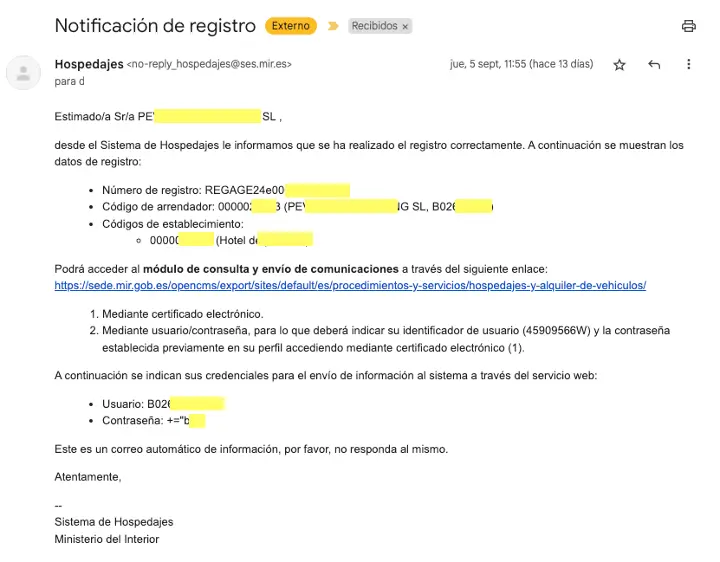
Once the process is finished, you’ll receive an email from the Ministry of the Interior with these important details:
- Registration number.
- Host code.
- Establishment code.
- Username and password for the web communications service.
4. Configuration with Roomdoo
So we can set up the automation correctly, send us the details you received (registration number, host code, establishment code, username, and password) to soporte@roomdoo.com.
Done!
Once we receive your details, we’ll configure the automation in Roomdoo so that traveller reports and reservations are sent without you having to lift a finger.