How to check out a reservation in Roomdoo on departure day: close the stay and get the room ready for the next sale.
Here’s how to check out a guest in Roomdoo:
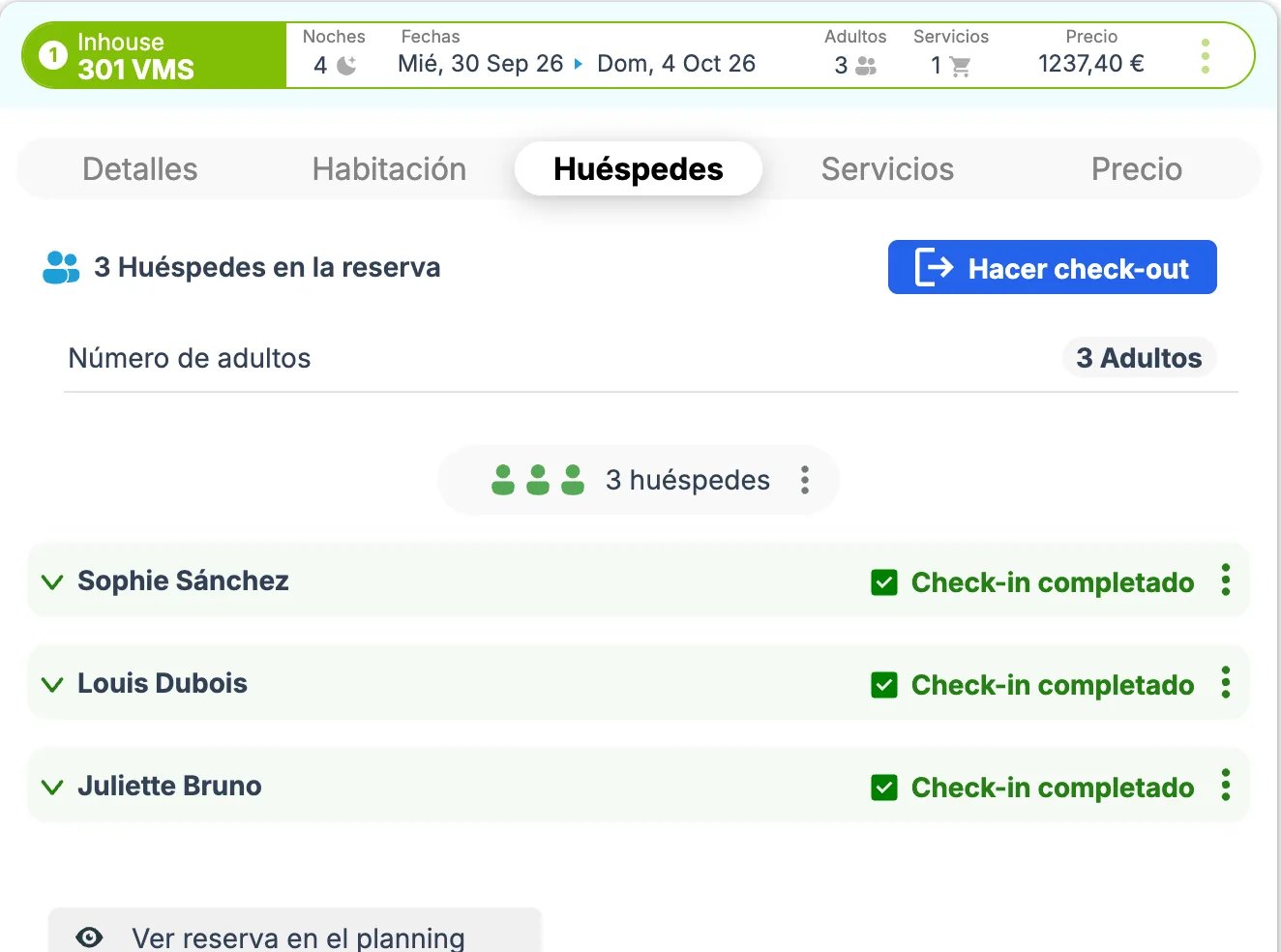
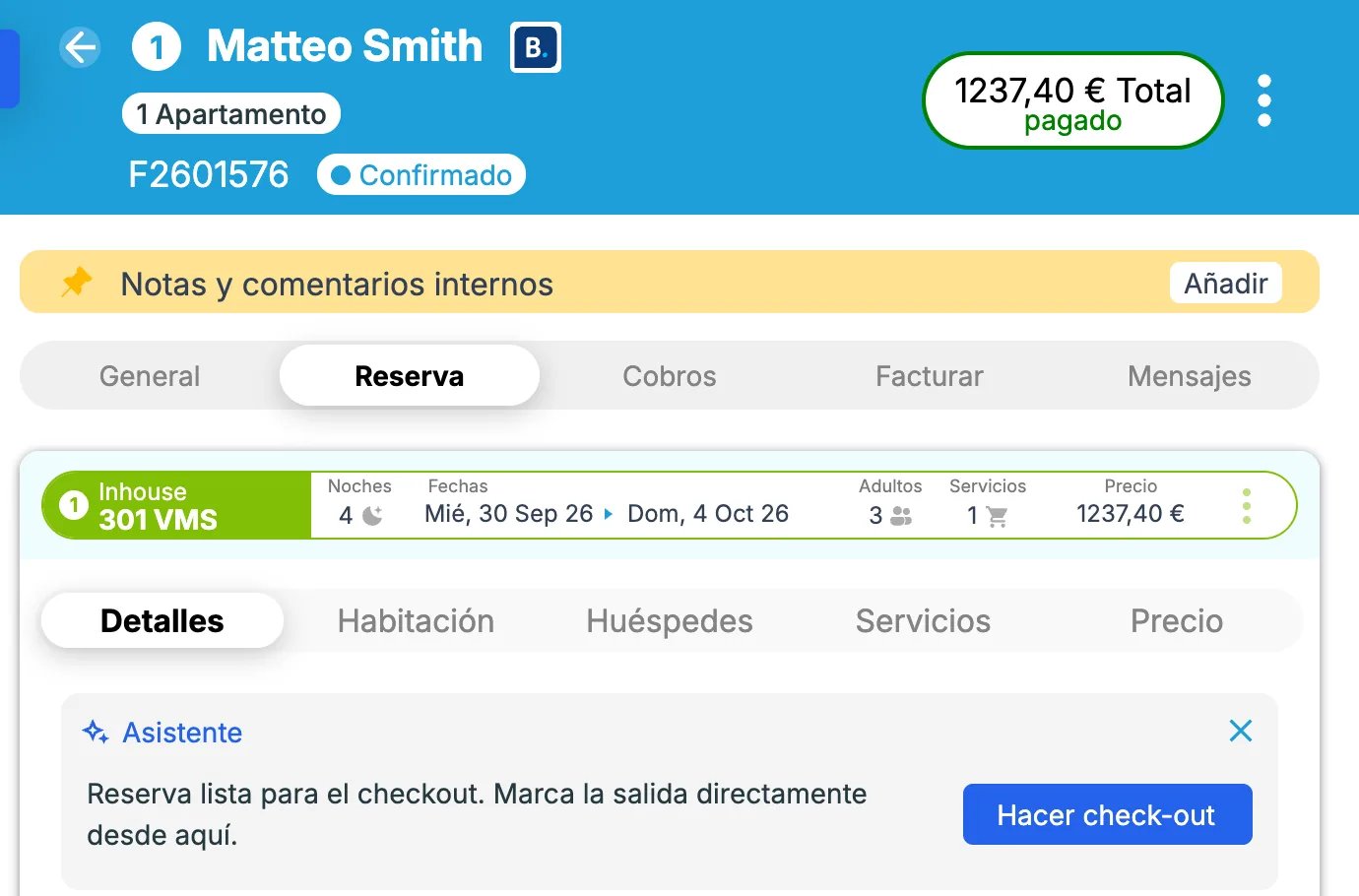
On the guest’s departure day, you can run the check-out in Roomdoo. Open the reservation, go to Reservation → Guests, and click Check-out. If the Assistant on the Details tab shows a Check-out button, you can use that too.
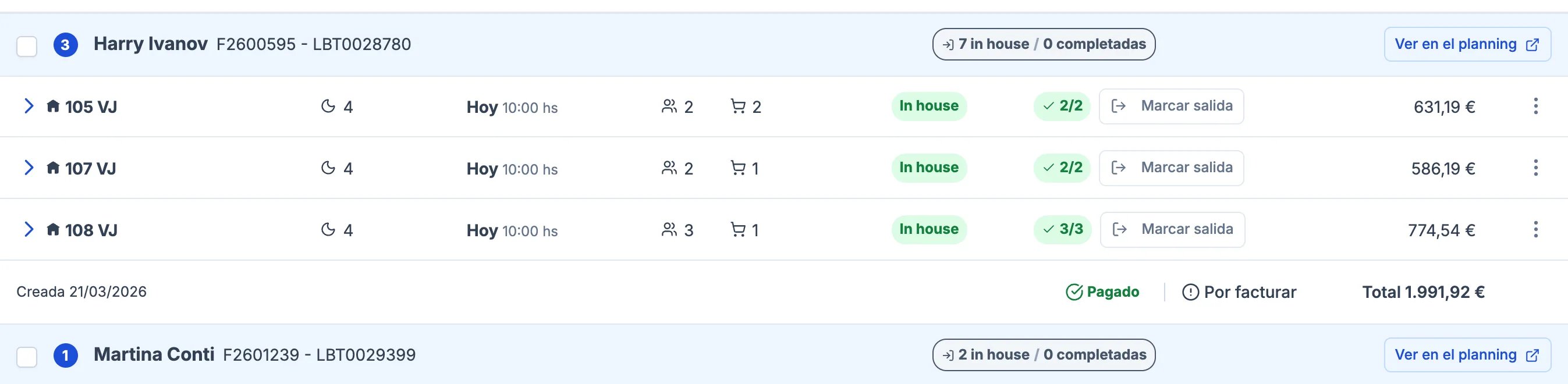
At that point, the reservation status becomes Completed.You can also mark the departure from the Reservations list: on the Departures tab, click Mark check-out on the reservation (or in its three-dots menu).
If the reservation isn’t shown as Completed after Mark check-out, open it in the planning (three-dots menu → View in planning) and finish the check-out with Check-out, from the Guests tab or from the Assistant on the Details tab. If neither button appears, contact support.
Check-out is only possible from the reservation’s departure date. If the guest leaves early, the stay has to be adjusted first (see Change the dates of a reservation). If the reservation came from an OTA or is already invoiced and you can’t shorten it, release the remaining nights with Reselling (see Early departure); in that case, the check-out is done from the original departure date.
{"docsConfig":{"theme":"mint","$schema":"https://mintlify.com/docs.json","name":"Roomdoo Academy","description":"Documentación oficial de Roomdoo — Property Management System para hoteles, apartamentos y alojamientos turísticos. Guías paso a paso de reservas, facturación, VeriFactu, SES Hospedajes, INE, channel manager y más.","colors":{"primary":"#2563EB","light":"#3B82F6","dark":"#1D4ED8"},"logo":{"light":"https://mintcdn.com/roomdoo/dcU5HPgFnTl9qd9p/logo/logo-text.svg?fit=max\u0026auto=format\u0026n=dcU5HPgFnTl9qd9p\u0026q=85\u0026s=ec3aa0078c2712f36e5795098dbede27","dark":"https://mintcdn.com/roomdoo/L80iuZPt53d3BoTP/logo/logo-text-dark.svg?fit=max\u0026auto=format\u0026n=L80iuZPt53d3BoTP\u0026q=85\u0026s=8a98ca14d5cb6a439d7b572de49ecf3e","href":"https://docs.roomdoo.com/"},"favicon":"https://mintcdn.com/roomdoo/RvHCUaYZaFauPHph/favicon.svg?fit=max\u0026auto=format\u0026n=RvHCUaYZaFauPHph\u0026q=85\u0026s=43ca272e416a47ecf56bba6fb1254020","appearance":{"strict":false},"navbar":{"links":[{"href":"https://roomdoo.com","label":"Roomdoo.com"},{"href":"https://bookai.roomdoo.com","label":"BookAI"}],"primary":{"type":"button","label":"Contactar soporte","href":"mailto:soporte@roomdoo.com"}},"footer":{"socials":{"x":"https://x.com/weraeroomdoo","linkedin":"https://linkedin.com/company/roomdoo","instagram":"https://instagram.com/weareroomdoo","github":"https://academy.roomdoo.com/website/social/github","youtube":"https://academy.roomdoo.com/website/social/youtube"},"links":[{"header":"Producto","items":[{"label":"Roomdoo","href":"https://roomdoo.com"},{"label":"Funcionalidades","href":"https://roomdoo.com/funcionalidades"},{"label":"BookAI","href":"https://bookai.roomdoo.com"},{"label":"Novedades","href":"https://roomdoo.com/novedades"}]},{"header":"Recursos","items":[{"label":"Documentación","href":"https://docs.roomdoo.com"},{"label":"Guía rápida en vídeos","href":"/es/course"},{"label":"Glosario PMS","href":"/es/resources/glossary"},{"label":"Novedades","href":"/es/changelog"}]},{"header":"Soporte","items":[{"label":"Contactar soporte","href":"mailto:soporte@roomdoo.com"},{"label":"Contacto comercial","href":"mailto:hola@roomdoo.com"}]}]},"search":{"prompt":"Busca o pregunta sobre Roomdoo..."},"seo":{"metatags":{"og:locale":"es_ES","og:site_name":"Roomdoo Academy","google-site-verification":"oTo1OklU8T0QMBTjw06gtLbeFptjwIC3W6dJxAJZjmg"},"indexing":"navigable"},"fonts":{"family":"Inter"},"errors":{"404":{"redirect":true}},"contextual":{"options":["copy","view","chatgpt","claude","perplexity","mcp","cursor","vscode"],"display":"header"},"metadata":{"timestamp":false},"styling":{"latex":false},"navigation":{"languages":[{"language":"es","default":true,"href":"es/start/welcome"},{"language":"en","href":"en/start/welcome"}]}},"deployment":{"deploymentMetadataValue":{"subdomain":"roomdoo","hasAudioNarration":false,"actualSubdomain":"roomdoo","customDomains":["docs.roomdoo.com"],"gitSource":{"type":"github","owner":"commitsun","repo":"roomdoo-docs","deployBranch":"main","contentDirectory":"","isPrivate":true,"mountPath":"","label":""},"entitlements":{},"buildId":"6af6de5a3522466a5b80c936","clientVersion":"0.0.4167","searchFilterCounts":[{"language":"en","tag":"Academy guides","count":103},{"language":"es","tag":"Guías Academy","count":103},{"language":"en","tag":"Reservations","count":25},{"language":"es","tag":"Reservas","count":25},{"language":"en","tag":"Settings","count":17},{"language":"es","tag":"Configuración","count":17},{"language":"en","tag":"Invoicing","count":13},{"language":"es","tag":"Facturación","count":13},{"language":"en","tag":"Compliance (SES, INE)","count":12},{"language":"es","tag":"Cumplimiento (SES, INE)","count":12},{"language":"en","tag":"Getting started course","count":11},{"language":"es","tag":"Curso de inicio","count":11},{"language":"en","tag":"Channel manager and OTAs","count":10},{"language":"en","tag":"Payments","count":10},{"language":"es","tag":"Channel Manager y OTAs","count":10},{"language":"es","tag":"Pagos","count":10},{"language":"en","tag":"INE","count":8},{"language":"en","tag":"Create and edit","count":8},{"language":"es","tag":"INE","count":8},{"language":"es","tag":"Crear y editar","count":8}]},"assistantConfig":{"enableAskAiButton":false,"enableStarterQuestions":false,"enableContextualStarterQuestions":false,"enableAskAiSearchBar":true},"basePath":"","hasChatPermissions":false,"hasWebMcpPermissions":false,"toggles":[{"name":"kill-isr","enabled":true,"variant":{"name":"disabled","enabled":false,"feature_enabled":true},"impressionData":false},{"name":"custom-rbac-roles","enabled":true,"variant":{"name":"disabled","enabled":false,"feature_enabled":true},"impressionData":false},{"name":"agent-mintlify-slack","enabled":true,"variant":{"name":"disabled","enabled":false,"feature_enabled":true},"impressionData":false},{"name":"agent-integrations-settings","enabled":true,"variant":{"name":"disabled","enabled":false,"feature_enabled":true},"impressionData":false},{"name":"rbac-expansion","enabled":true,"variant":{"name":"disabled","enabled":false,"feature_enabled":true},"impressionData":false},{"name":"automations-pr-grouping","enabled":true,"variant":{"name":"disabled","enabled":false,"feature_enabled":true},"impressionData":false},{"name":"custom-prefix","enabled":true,"variant":{"name":"disabled","enabled":false,"feature_enabled":true},"impressionData":false},{"name":"analytics-v7","enabled":true,"variant":{"name":"disabled","enabled":false,"feature_enabled":true},"impressionData":false},{"name":"user-flows-analytics","enabled":true,"variant":{"name":"disabled","enabled":false,"feature_enabled":true},"impressionData":false},{"name":"no-publish-flow","enabled":true,"variant":{"name":"disabled","enabled":false,"feature_enabled":true},"impressionData":false},{"name":"workos-onboarding","enabled":true,"variant":{"name":"disabled","enabled":false,"feature_enabled":true},"impressionData":false},{"name":"snapshot-serving-live","enabled":true,"variant":{"name":"disabled","enabled":false,"feature_enabled":true},"impressionData":false},{"name":"stripTemperatureMiddleware","enabled":true,"variant":{"name":"disabled","enabled":false,"feature_enabled":true},"impressionData":false},{"name":"support-platform-pylon-zendesk","enabled":true,"variant":{"name":"disabled","enabled":false,"feature_enabled":true},"impressionData":false},{"name":"snapshot-serving","enabled":true,"variant":{"name":"disabled","enabled":false,"feature_enabled":true},"impressionData":false},{"name":"instant-rollback","enabled":true,"variant":{"name":"disabled","enabled":false,"feature_enabled":true},"impressionData":false},{"name":"granular-notifications-server","enabled":true,"variant":{"name":"disabled","enabled":false,"feature_enabled":true},"impressionData":false},{"name":"granular-notifications","enabled":true,"variant":{"name":"disabled","enabled":false,"feature_enabled":true},"impressionData":false},{"name":"automations-fable","enabled":true,"variant":{"name":"disabled","enabled":false,"feature_enabled":true},"impressionData":false},{"name":"fixed-ai-action-pricing","enabled":true,"variant":{"name":"disabled","enabled":false,"feature_enabled":true},"impressionData":false},{"name":"automation-resolve-merge-conflict","enabled":true,"variant":{"name":"disabled","enabled":false,"feature_enabled":true},"impressionData":false},{"name":"scoped-publishing","enabled":true,"variant":{"name":"disabled","enabled":false,"feature_enabled":true},"impressionData":false},{"name":"mintql","enabled":true,"variant":{"name":"disabled","enabled":false,"feature_enabled":true},"impressionData":false},{"name":"page-level-analytics","enabled":true,"variant":{"name":"disabled","enabled":false,"feature_enabled":true},"impressionData":false},{"name":"editor-version-history-v2","enabled":true,"variant":{"name":"disabled","enabled":false,"feature_enabled":true},"impressionData":false},{"name":"billing-page-v2","enabled":true,"variant":{"name":"disabled","enabled":false,"feature_enabled":true},"impressionData":false},{"name":"full-page-search","enabled":true,"variant":{"name":"disabled","enabled":false,"feature_enabled":true},"impressionData":false},{"name":"workspace-projects","enabled":true,"variant":{"name":"disabled","enabled":false,"feature_enabled":true},"impressionData":false},{"name":"assistant-v5","enabled":true,"variant":{"name":"disabled","enabled":false,"feature_enabled":true},"impressionData":false},{"name":"fork-pr-previews","enabled":true,"variant":{"name":"disabled","enabled":false,"feature_enabled":true},"impressionData":false},{"name":"revalidation-jwt","enabled":true,"variant":{"name":"disabled","enabled":false,"feature_enabled":true},"impressionData":false},{"name":"workos-sso-scim","enabled":true,"variant":{"name":"disabled","enabled":false,"feature_enabled":true},"impressionData":false},{"name":"hobby-abuse-scan","enabled":true,"variant":{"name":"disabled","enabled":false,"feature_enabled":true},"impressionData":false},{"name":"dashboard-inbox","enabled":true,"variant":{"name":"disabled","enabled":false,"feature_enabled":true},"impressionData":false},{"name":"workos-signup","enabled":true,"variant":{"name":"disabled","enabled":false,"feature_enabled":true},"impressionData":false},{"name":"turbopuffer-dual-write","enabled":true,"variant":{"name":"disabled","enabled":false,"feature_enabled":true},"impressionData":false},{"name":"workos-enabled","enabled":true,"variant":{"name":"disabled","enabled":false,"feature_enabled":true},"impressionData":false},{"name":"approve-review-flow","enabled":true,"variant":{"name":"disabled","enabled":false,"feature_enabled":true},"impressionData":false},{"name":"editor-metadata","enabled":true,"variant":{"name":"disabled","enabled":false,"feature_enabled":true},"impressionData":false},{"name":"sso-setup-deadline-banner","enabled":true,"variant":{"name":"disabled","enabled":false,"feature_enabled":true},"impressionData":false},{"name":"turbopuffer-serve","enabled":true,"variant":{"name":"disabled","enabled":false,"feature_enabled":true},"impressionData":false},{"name":"live-agents","enabled":true,"variant":{"name":"disabled","enabled":false,"feature_enabled":true},"impressionData":false},{"name":"starter-pricing","enabled":true,"variant":{"name":"control","enabled":true,"payload":{"type":"string","value":"control"},"feature_enabled":true},"impressionData":false},{"name":"llms-txt-v2","enabled":true,"variant":{"name":"disabled","enabled":false,"feature_enabled":true},"impressionData":false}],"googleFontsInlined":false},"customCss":[{"filePath":"style.css","content":"img,iframe,video{border-radius:12px}#navbar img,#navbar svg,footer img,footer svg{border-radius:0}.news-carousel img{border-radius:0}#content-area:has(.course-owns-nav) #pagination{display:none}"}],"page":{"pagePath":"en/reservations/check-out","slug":"/en/reservations/check-out","pageMetadata":{"title":"How to check out a guest in Roomdoo","description":"How to check out a reservation in Roomdoo on departure day: close the stay and get the room ready for the next sale.","sidebarTitle":"How to check out","icon":"arrow-up-from-line","href":"/en/reservations/check-out"},"description":{"compiledSource":"\"use strict\";\nconst {jsx: _jsx} = arguments[0];\nconst {useMDXComponents: _provideComponents} = arguments[0];\nfunction _createMdxContent(props) {\n const _components = {\n p: \"p\",\n ..._provideComponents(),\n ...props.components\n };\n return _jsx(_components.p, {\n children: \"How to check out a reservation in Roomdoo on departure day: close the stay and get the room ready for the next sale.\"\n });\n}\nfunction MDXContent(props = {}) {\n const {wrapper: MDXLayout} = {\n ..._provideComponents(),\n ...props.components\n };\n return MDXLayout ? _jsx(MDXLayout, {\n ...props,\n children: _jsx(_createMdxContent, {\n ...props\n })\n }) : _createMdxContent(props);\n}\nreturn {\n default: MDXContent\n};\n","frontmatter":{},"scope":{}},"pageType":"default","mdx":{"mdxSource":{"compiledSource":"\"use strict\";const{Fragment:_Fragment,jsx:_jsx,jsxs:_jsxs}=arguments[0];const{useMDXComponents:_provideComponents}=arguments[0];function _createMdxContent(props){const _components={a:`a`,p:`p`,strong:`strong`,..._provideComponents(),...props.components},{Info,Note,OptimizedFrame,OptimizedImage,Tip}=_components;if(!Info)_missingMdxReference(`Info`,true);if(!Note)_missingMdxReference(`Note`,true);if(!OptimizedFrame)_missingMdxReference(`OptimizedFrame`,true);if(!OptimizedImage)_missingMdxReference(`OptimizedImage`,true);if(!Tip)_missingMdxReference(`Tip`,true);return _jsxs(_Fragment,{children:[_jsx(_components.p,{children:`Here’s how to check out a guest in Roomdoo:`}),`\n`,_jsx(OptimizedFrame,{width:`100%`,height:`400`,src:`https://www.youtube.com/embed/p68QXSW7GS0`,title:`Introducción a Roomdoo`,frameBorder:`0`,allow:`accelerometer; autoplay; clipboard-write; encrypted-media; gyroscope; picture-in-picture`,allowFullScreen:true}),`\n`,_jsxs(_components.p,{children:[`On the guest’s departure day, you can run the check-out in Roomdoo. Open the reservation, go to `,_jsx(_components.strong,{children:`Reservation → Guests`}),`, and click `,_jsx(_components.strong,{children:`Check-out`}),`. If the `,_jsx(_components.strong,{children:`Assistant`}),` on the `,_jsx(_components.strong,{children:`Details`}),` tab shows a `,_jsx(_components.strong,{children:`Check-out`}),` button, you can use that too.`]}),`\n`,_jsx(`div`,{style:{display:`flex`,justifyContent:`center`},children:_jsx(OptimizedImage,{src:`https://mintcdn.com/roomdoo/n28u4xnt3XWARaha/images/reservas/huespedes-hacer-checkout.webp?fit=max\u0026auto=format\u0026n=n28u4xnt3XWARaha\u0026q=85\u0026s=86104271b051969f2e7fb2eccc18019d`,alt:`Guests tab of an in-house reservation with the Check-out button and the guests with check-in completed`,style:{maxWidth:`600px`,width:`100%`},\"data-og-width\":`1324`,width:`1324`,\"data-og-height\":`984`,height:`984`,\"data-path\":`images/reservas/huespedes-hacer-checkout.webp`,\"data-optimize\":`true`,\"data-opv\":`3`,srcset:`https://mintcdn.com/roomdoo/n28u4xnt3XWARaha/images/reservas/huespedes-hacer-checkout.webp?w=280\u0026fit=max\u0026auto=format\u0026n=n28u4xnt3XWARaha\u0026q=85\u0026s=cf0fad53d4cd15bde028fb0dc727fe9c 280w, https://mintcdn.com/roomdoo/n28u4xnt3XWARaha/images/reservas/huespedes-hacer-checkout.webp?w=560\u0026fit=max\u0026auto=format\u0026n=n28u4xnt3XWARaha\u0026q=85\u0026s=5bc0dfb1137520cd920216038c69ce3a 560w, https://mintcdn.com/roomdoo/n28u4xnt3XWARaha/images/reservas/huespedes-hacer-checkout.webp?w=840\u0026fit=max\u0026auto=format\u0026n=n28u4xnt3XWARaha\u0026q=85\u0026s=9b2f247d36a37b35794496f1fe8cc592 840w, https://mintcdn.com/roomdoo/n28u4xnt3XWARaha/images/reservas/huespedes-hacer-checkout.webp?w=1100\u0026fit=max\u0026auto=format\u0026n=n28u4xnt3XWARaha\u0026q=85\u0026s=67a5931a1a1137354f90ff2d076a9027 1100w, https://mintcdn.com/roomdoo/n28u4xnt3XWARaha/images/reservas/huespedes-hacer-checkout.webp?w=1650\u0026fit=max\u0026auto=format\u0026n=n28u4xnt3XWARaha\u0026q=85\u0026s=814853e092f42a67afdfe4120a66dd6a 1650w, https://mintcdn.com/roomdoo/n28u4xnt3XWARaha/images/reservas/huespedes-hacer-checkout.webp?w=2500\u0026fit=max\u0026auto=format\u0026n=n28u4xnt3XWARaha\u0026q=85\u0026s=85c815cb93b6bfecedfbb14ccd9bd6d7 2500w`})}),`\n`,_jsx(`div`,{style:{display:`flex`,justifyContent:`center`},children:_jsx(OptimizedImage,{src:`https://mintcdn.com/roomdoo/rfqGgeweKpo9W0XD/images/reservas/asistente-hacer-checkout.webp?fit=max\u0026auto=format\u0026n=rfqGgeweKpo9W0XD\u0026q=85\u0026s=630df49df6e9cbb67debed28fbec6157`,alt:`Assistant box on the Details tab with the Check-out button`,style:{maxWidth:`600px`,width:`100%`},\"data-og-width\":`1380`,width:`1380`,\"data-og-height\":`910`,height:`910`,\"data-path\":`images/reservas/asistente-hacer-checkout.webp`,\"data-optimize\":`true`,\"data-opv\":`3`,srcset:`https://mintcdn.com/roomdoo/rfqGgeweKpo9W0XD/images/reservas/asistente-hacer-checkout.webp?w=280\u0026fit=max\u0026auto=format\u0026n=rfqGgeweKpo9W0XD\u0026q=85\u0026s=4b7f6fbba87d04b22d648c4c0619a8ac 280w, https://mintcdn.com/roomdoo/rfqGgeweKpo9W0XD/images/reservas/asistente-hacer-checkout.webp?w=560\u0026fit=max\u0026auto=format\u0026n=rfqGgeweKpo9W0XD\u0026q=85\u0026s=132c54290e94bd5f68bfbcfd90dd00a3 560w, https://mintcdn.com/roomdoo/rfqGgeweKpo9W0XD/images/reservas/asistente-hacer-checkout.webp?w=840\u0026fit=max\u0026auto=format\u0026n=rfqGgeweKpo9W0XD\u0026q=85\u0026s=ac3a6b81099f9695395127cc00f0c13a 840w, https://mintcdn.com/roomdoo/rfqGgeweKpo9W0XD/images/reservas/asistente-hacer-checkout.webp?w=1100\u0026fit=max\u0026auto=format\u0026n=rfqGgeweKpo9W0XD\u0026q=85\u0026s=3cba55e6beef872ed40606f94b91e9f4 1100w, https://mintcdn.com/roomdoo/rfqGgeweKpo9W0XD/images/reservas/asistente-hacer-checkout.webp?w=1650\u0026fit=max\u0026auto=format\u0026n=rfqGgeweKpo9W0XD\u0026q=85\u0026s=1b4cdb069533c8257b5043c022798d11 1650w, https://mintcdn.com/roomdoo/rfqGgeweKpo9W0XD/images/reservas/asistente-hacer-checkout.webp?w=2500\u0026fit=max\u0026auto=format\u0026n=rfqGgeweKpo9W0XD\u0026q=85\u0026s=c703eb164c7aff0914eb56666e2a77be 2500w`})}),`\n`,_jsxs(_components.p,{children:[`At that point, the reservation status becomes `,_jsx(_components.strong,{children:`Completed`}),`.`]}),`\n`,_jsxs(_components.p,{children:[`You can also mark the departure from the `,_jsx(_components.strong,{children:`Reservations`}),` list: on the `,_jsx(_components.strong,{children:`Departures`}),` tab, click `,_jsx(_components.strong,{children:`Mark check-out`}),` on the reservation (or in its three-dots menu).`]}),`\n`,_jsx(`div`,{style:{display:`flex`,justifyContent:`center`},children:_jsx(OptimizedImage,{src:`https://mintcdn.com/roomdoo/n28u4xnt3XWARaha/images/reservas/listado-salidas-marcar-salida.webp?fit=max\u0026auto=format\u0026n=n28u4xnt3XWARaha\u0026q=85\u0026s=a5091b2ec1c9cd9e0e1c2dae504a341c`,alt:`Departures tab of the reservations list with the Mark check-out button on each reservation`,style:{maxWidth:`600px`,width:`100%`},\"data-og-width\":`2694`,width:`2694`,\"data-og-height\":`660`,height:`660`,\"data-path\":`images/reservas/listado-salidas-marcar-salida.webp`,\"data-optimize\":`true`,\"data-opv\":`3`,srcset:`https://mintcdn.com/roomdoo/n28u4xnt3XWARaha/images/reservas/listado-salidas-marcar-salida.webp?w=280\u0026fit=max\u0026auto=format\u0026n=n28u4xnt3XWARaha\u0026q=85\u0026s=a8da6eca62f2b02d51a8e1fcf9a7cbff 280w, https://mintcdn.com/roomdoo/n28u4xnt3XWARaha/images/reservas/listado-salidas-marcar-salida.webp?w=560\u0026fit=max\u0026auto=format\u0026n=n28u4xnt3XWARaha\u0026q=85\u0026s=7454e05d22fa8fe233b4ed2ad5942059 560w, https://mintcdn.com/roomdoo/n28u4xnt3XWARaha/images/reservas/listado-salidas-marcar-salida.webp?w=840\u0026fit=max\u0026auto=format\u0026n=n28u4xnt3XWARaha\u0026q=85\u0026s=f41886433ce0b42d8d0b4d0b25a80b59 840w, https://mintcdn.com/roomdoo/n28u4xnt3XWARaha/images/reservas/listado-salidas-marcar-salida.webp?w=1100\u0026fit=max\u0026auto=format\u0026n=n28u4xnt3XWARaha\u0026q=85\u0026s=7c4731ec803e8f95b101d2bf2f5c4bdb 1100w, https://mintcdn.com/roomdoo/n28u4xnt3XWARaha/images/reservas/listado-salidas-marcar-salida.webp?w=1650\u0026fit=max\u0026auto=format\u0026n=n28u4xnt3XWARaha\u0026q=85\u0026s=24ea5ad453b6910b63f17760773b70de 1650w, https://mintcdn.com/roomdoo/n28u4xnt3XWARaha/images/reservas/listado-salidas-marcar-salida.webp?w=2500\u0026fit=max\u0026auto=format\u0026n=n28u4xnt3XWARaha\u0026q=85\u0026s=e66bececfb41db18a7e2bb0b2c694c8b 2500w`})}),`\n`,_jsx(Note,{children:_jsxs(_components.p,{children:[`If the reservation isn’t shown as `,_jsx(_components.strong,{children:`Completed`}),` after `,_jsx(_components.strong,{children:`Mark check-out`}),`, open it in the planning (three-dots menu → `,_jsx(_components.strong,{children:`View in planning`}),`) and finish the check-out with `,_jsx(_components.strong,{children:`Check-out`}),`, from the `,_jsx(_components.strong,{children:`Guests`}),` tab or from the `,_jsx(_components.strong,{children:`Assistant`}),` on the `,_jsx(_components.strong,{children:`Details`}),` tab. If neither button appears, contact support.`]})}),`\n`,_jsx(Tip,{children:_jsxs(_components.p,{children:[`Check-out is only possible from the reservation’s departure date. If the guest leaves early, the stay has to be adjusted first (see `,_jsx(_components.a,{href:`/en/reservations/change-dates`,children:`Change the dates of a reservation`}),`). If the reservation came from an OTA or is already invoiced and you can’t shorten it, release the remaining nights with `,_jsx(_components.strong,{children:`Reselling`}),` (see `,_jsx(_components.a,{href:`/en/reservations/change-dates#early-departure-release-nights-without-shortening-the-reservation`,children:`Early departure`}),`); in that case, the check-out is done from the original departure date.`]})}),`\n`,_jsx(Info,{children:_jsxs(_components.p,{children:[`See here how to `,_jsx(_components.a,{href:`/en/reservations/check-in`,children:`check in a guest in Roomdoo`}),`.`]})})]})}function MDXContent(props={}){const{wrapper:MDXLayout}={..._provideComponents(),...props.components};return MDXLayout?_jsx(MDXLayout,{...props,children:_jsx(_createMdxContent,{...props})}):_createMdxContent(props)}return{default:MDXContent};function _missingMdxReference(id,component){throw new Error(`Expected `+(component?`component`:`object`)+\" `\"+id+\"` to be defined: you likely forgot to import, pass, or provide it.\")}","frontmatter":{},"scope":{"config":{},"pageMetadata":{"title":"How to check out a guest in Roomdoo","description":"How to check out a reservation in Roomdoo on departure day: close the stay and get the room ready for the next sale.","sidebarTitle":"How to check out","icon":"arrow-up-from-line","href":"/en/reservations/check-out"}}},"mdxSourceWithNoJs":null},"mdxExtracts":{"tableOfContents":[],"codeExamples":{}},"jsLinks":[],"subdomain":"roomdoo","siteName":"Roomdoo Academy","title":"How to check out a guest in Roomdoo - Roomdoo Academy","navMaps":{"firstHrefInVersion":{},"firstHrefInLanguage":{"es":{"href":"/es/reservations/check-out","matchLevel":1},"en":{"href":"/en/reservations/check-out","matchLevel":0}}},"lastModified":"2026-10-05T10:46:27.742Z","originalFileLocation":"en/reservations/check-out.mdx","locale":"en"},"headHtml":"\u003cscript data-mint-head>(function(){var d=document.documentElement,p=null;if(!p){try{p=localStorage.getItem(\"isDarkMode\")}catch(e){}if(p==='true')p='dark';else if(p==='false')p='light';if(p!=='light'\u0026\u0026p!=='dark'\u0026\u0026p!=='system')p=\"system\"}var r=p==='system'?(matchMedia(\"(prefers-color-scheme: dark)\").matches?'dark':'light'):p;d.classList.remove(r==='dark'?'light':'dark');d.classList.add(r);d.setAttribute(\"data-theme-preference\",p)})();\u003c/script>\u003cmeta data-mint-head name=\"description\" content=\"How to check out a reservation in Roomdoo on departure day: close the stay and get the room ready for the next sale.\">\u003cmeta data-mint-head name=\"application-name\" content=\"Roomdoo Academy\">\u003cmeta data-mint-head name=\"generator\" content=\"Mintlify\">\u003clink data-mint-head rel=\"icon\" type=\"image/png\" sizes=\"192x192\" href=\"/mintlify-assets/_mintlify/favicons/roomdoo/S06YlLbnwibaZ5AN/_generated/favicon/android-chrome-192x192.png\" media=\"(prefers-color-scheme: light)\">\u003clink data-mint-head rel=\"apple-touch-icon\" type=\"image/png\" sizes=\"180x180\" href=\"/mintlify-assets/_mintlify/favicons/roomdoo/S06YlLbnwibaZ5AN/_generated/favicon/apple-touch-icon.png\">\u003clink data-mint-head rel=\"icon\" type=\"image/png\" sizes=\"16x16\" href=\"/mintlify-assets/_mintlify/favicons/roomdoo/S06YlLbnwibaZ5AN/_generated/favicon/favicon-16x16.png\" media=\"(prefers-color-scheme: light)\">\u003clink data-mint-head rel=\"icon\" type=\"image/png\" sizes=\"32x32\" href=\"/mintlify-assets/_mintlify/favicons/roomdoo/S06YlLbnwibaZ5AN/_generated/favicon/favicon-32x32.png\" media=\"(prefers-color-scheme: light)\">\u003clink data-mint-head rel=\"shortcut icon\" type=\"image/x-icon\" href=\"/mintlify-assets/_mintlify/favicons/roomdoo/S06YlLbnwibaZ5AN/_generated/favicon/favicon.ico\" media=\"(prefers-color-scheme: light)\">\u003clink data-mint-head rel=\"icon\" type=\"image/png\" sizes=\"192x192\" href=\"/mintlify-assets/_mintlify/favicons/roomdoo/S06YlLbnwibaZ5AN/_generated/favicon-dark/android-chrome-192x192.png\" media=\"(prefers-color-scheme: dark)\">\u003clink data-mint-head rel=\"icon\" type=\"image/png\" sizes=\"16x16\" href=\"/mintlify-assets/_mintlify/favicons/roomdoo/S06YlLbnwibaZ5AN/_generated/favicon-dark/favicon-16x16.png\" media=\"(prefers-color-scheme: dark)\">\u003clink data-mint-head rel=\"icon\" type=\"image/png\" sizes=\"32x32\" href=\"/mintlify-assets/_mintlify/favicons/roomdoo/S06YlLbnwibaZ5AN/_generated/favicon-dark/favicon-32x32.png\" media=\"(prefers-color-scheme: dark)\">\u003clink data-mint-head rel=\"shortcut icon\" type=\"image/x-icon\" href=\"/mintlify-assets/_mintlify/favicons/roomdoo/S06YlLbnwibaZ5AN/_generated/favicon-dark/favicon.ico\" media=\"(prefers-color-scheme: dark)\">\u003cmeta data-mint-head property=\"og:title\" content=\"How to check out a guest in Roomdoo - Roomdoo Academy\">\u003cmeta data-mint-head property=\"og:description\" content=\"How to check out a reservation in Roomdoo on departure day: close the stay and get the room ready for the next sale.\">\u003cmeta data-mint-head property=\"og:site_name\" content=\"Roomdoo Academy\">\u003cmeta data-mint-head property=\"og:url\" content=\"https://docs.roomdoo.com/en/reservations/check-out\">\u003cmeta data-mint-head property=\"og:type\" content=\"website\">\u003cmeta data-mint-head property=\"og:image\" content=\"https://roomdoo.mintlify.site/_mintlify/api/og/v2?division=Check-in+and+check-out\u0026amp;title=How+to+check+out+a+guest+in+Roomdoo\u0026amp;description=How+to+check+out+a+reservation+in+Roomdoo+on+departure+day%3A+close+the+stay+and+get+the+room+ready+for+the+next+sale.\u0026amp;theme=cb90489e0e5748af3cabcbcd\u0026amp;signature=b377807a6bb1d0275ebd82271333e3c5781c9ae88bcde56d79fdb3475b63dc9a\">\u003cmeta data-mint-head property=\"og:image:width\" content=\"1200\">\u003cmeta data-mint-head property=\"og:image:height\" content=\"630\">\u003cmeta data-mint-head name=\"twitter:card\" content=\"summary_large_image\">\u003cmeta data-mint-head name=\"twitter:title\" content=\"How to check out a guest in Roomdoo - Roomdoo Academy\">\u003cmeta data-mint-head name=\"twitter:description\" content=\"How to check out a reservation in Roomdoo on departure day: close the stay and get the room ready for the next sale.\">\u003cmeta data-mint-head name=\"twitter:image\" content=\"https://roomdoo.mintlify.site/_mintlify/api/og/v2?division=Check-in+and+check-out\u0026amp;title=How+to+check+out+a+guest+in+Roomdoo\u0026amp;description=How+to+check+out+a+reservation+in+Roomdoo+on+departure+day%3A+close+the+stay+and+get+the+room+ready+for+the+next+sale.\u0026amp;theme=cb90489e0e5748af3cabcbcd\u0026amp;signature=b377807a6bb1d0275ebd82271333e3c5781c9ae88bcde56d79fdb3475b63dc9a\">\u003cmeta data-mint-head name=\"twitter:image:width\" content=\"1200\">\u003cmeta data-mint-head name=\"twitter:image:height\" content=\"630\">\u003cmeta data-mint-head name=\"msapplication-config\" content=\"/mintlify-assets/_mintlify/favicons/roomdoo/S06YlLbnwibaZ5AN/_generated/favicon/browserconfig.xml\">\u003cmeta data-mint-head name=\"apple-mobile-web-app-title\" content=\"Roomdoo Academy\">\u003cmeta data-mint-head name=\"msapplication-TileColor\" content=\"#2563EB\">\u003cmeta data-mint-head name=\"og:locale\" content=\"es_ES\">\u003cmeta data-mint-head name=\"google-site-verification\" content=\"oTo1OklU8T0QMBTjw06gtLbeFptjwIC3W6dJxAJZjmg\">\u003clink data-mint-head rel=\"canonical\" href=\"https://docs.roomdoo.com/en/reservations/check-out\">\u003clink data-mint-head rel=\"alternate\" type=\"application/xml\" href=\"/sitemap.xml\">\u003clink data-mint-head rel=\"alternate\" type=\"text/markdown\" href=\"/en/reservations/check-out.md\">\u003clink data-mint-head rel=\"alternate\" hreflang=\"en\" href=\"https://docs.roomdoo.com/en/reservations/check-out\">\u003clink data-mint-head rel=\"alternate\" hreflang=\"es\" href=\"https://docs.roomdoo.com/es/reservations/check-out\">\u003clink data-mint-head rel=\"alternate\" hreflang=\"x-default\" href=\"https://docs.roomdoo.com/es/reservations/check-out\">\u003cscript data-mint-head type=\"application/ld+json\">{\"@context\":\"https://schema.org\",\"@graph\":[{\"@type\":\"Organization\",\"@id\":\"https://docs.roomdoo.com/#organization\",\"name\":\"Roomdoo Academy\",\"url\":\"https://docs.roomdoo.com\",\"logo\":{\"@type\":\"ImageObject\",\"url\":\"https://mintcdn.com/roomdoo/dcU5HPgFnTl9qd9p/logo/logo-text.svg?fit=max\u0026auto=format\u0026n=dcU5HPgFnTl9qd9p\u0026q=85\u0026s=ec3aa0078c2712f36e5795098dbede27\"}},{\"@type\":\"WebSite\",\"@id\":\"https://docs.roomdoo.com#website\",\"name\":\"Roomdoo Academy\",\"url\":\"https://docs.roomdoo.com\",\"publisher\":{\"@id\":\"https://docs.roomdoo.com/#organization\"}},{\"@type\":\"WebPage\",\"@id\":\"https://docs.roomdoo.com/en/reservations/check-out#webpage\",\"url\":\"https://docs.roomdoo.com/en/reservations/check-out\",\"name\":\"How to check out a guest in Roomdoo\",\"description\":\"How to check out a reservation in Roomdoo on departure day: close the stay and get the room ready for the next sale.\",\"dateModified\":\"2026-10-05T10:46:27.742Z\",\"isPartOf\":{\"@id\":\"https://docs.roomdoo.com#website\"},\"breadcrumb\":{\"@id\":\"https://docs.roomdoo.com/en/reservations/check-out#breadcrumb\"}},{\"@type\":\"BreadcrumbList\",\"@id\":\"https://docs.roomdoo.com/en/reservations/check-out#breadcrumb\",\"itemListElement\":[{\"@type\":\"ListItem\",\"position\":1,\"name\":\"Reservations\",\"item\":\"https://docs.roomdoo.com/en/reservations/manage-reservations\"},{\"@type\":\"ListItem\",\"position\":2,\"name\":\"Check-in and check-out\",\"item\":\"https://docs.roomdoo.com/en/reservations/check-in\"},{\"@type\":\"ListItem\",\"position\":3,\"name\":\"How to check out a guest in Roomdoo\",\"item\":\"https://docs.roomdoo.com/en/reservations/check-out\"}]},{\"@type\":[\"Article\",\"TechArticle\"],\"@id\":\"https://docs.roomdoo.com/en/reservations/check-out#article\",\"headline\":\"How to check out a guest in Roomdoo\",\"name\":\"How to check out a guest in Roomdoo\",\"description\":\"How to check out a reservation in Roomdoo on departure day: close the stay and get the room ready for the next sale.\",\"url\":\"https://docs.roomdoo.com/en/reservations/check-out\",\"mainEntityOfPage\":{\"@id\":\"https://docs.roomdoo.com/en/reservations/check-out#webpage\"},\"dateModified\":\"2026-10-05T10:46:27.742Z\",\"publisher\":{\"@id\":\"https://docs.roomdoo.com/#organization\"},\"isPartOf\":{\"@id\":\"https://docs.roomdoo.com#website\"}}]}\u003c/script>\u003cscript data-mint-head type=\"application/ld+json\">{\"@context\":\"https://schema.org\",\"@type\":\"WebSite\",\"name\":\"Roomdoo Academy\",\"publisher\":{\"@type\":\"Organization\",\"name\":\"Roomdoo Academy\"},\"provider\":{\"@type\":\"Organization\",\"name\":\"Mintlify\",\"url\":\"https://mintlify.com\"}}\u003c/script>","agentPointerHref":"/en/reservations/check-out.md","siteName":"Roomdoo Academy","nav":{"global":null,"languages":[{"language":"es","default":true,"pages":[{"title":"es","href":"/es/reservations/check-out"}]},{"language":"en","tabs":[{"tab":"Academy guides","pages":[{"group":"Get started","icon":"house","pages":[{"title":"How can we help?","icon":"house","mode":"wide","href":"/en/start/welcome"},{"title":"Where to start by role","icon":"route","href":"/en/start/by-role"}]},{"group":"Reservations","icon":"calendar","pages":[{"group":"Getting started","icon":"play","pages":[{"title":"Managing reservations","icon":"calendar","href":"/en/reservations/manage-reservations"},{"title":"Creating direct reservations","icon":"newspaper","href":"/en/reservations/create-reservation"},{"title":"Searching for reservations","icon":"magnifying-glass","href":"/en/reservations/search-reservations"},{"title":"Planning colours: what each reservation state means","icon":"palette","href":"/en/reservations/planning-colors"}]},{"group":"Check-in and check-out","icon":"door-open","pages":[{"title":"How to check in a guest in Roomdoo","description":"Step-by-step guide to checking in a reservation in Roomdoo: verify guests, complete their details and mark the arrival in seconds.","sidebarTitle":"How to check in","icon":"arrow-down-to-line","href":"/en/reservations/check-in"},{"title":"How to check out a guest in Roomdoo","sidebarTitle":"How to check out","icon":"arrow-up-from-line","href":"/en/reservations/check-out"},{"title":"The auto check-in link doesn't work","description":"What to do when the online check-in link sent to the guest doesn't let them access.","icon":"link-slash","href":"/en/reservations/auto-check-in-link"},{"title":"How to handle a no-show","icon":"user-slash","href":"/en/reservations/no-show"},{"title":"Check-in won't go through","icon":"triangle-exclamation","href":"/en/reservations/check-in-blocked"},{"title":"Undo a check-in or check-out","icon":"rotate-left","href":"/en/reservations/undo-check-in-out"}]},{"group":"Modifications","icon":"pen-to-square","pages":[{"title":"Change the dates of a reservation","icon":"calendar","href":"/en/reservations/change-dates"},{"title":"Change the number of guests (pax) on a reservation","icon":"users","href":"/en/reservations/change-guest-count"},{"title":"The system assigned a different room than booked","icon":"right-left","href":"/en/reservations/room-reassignment"},{"title":"Add or remove rooms in a group","icon":"people-group","href":"/en/reservations/add-remove-rooms-group"}]},{"group":"Blocks","icon":"ban","pages":[{"title":"Creating blocks","icon":"lock-keyhole","href":"/en/reservations/blocks"},{"title":"Room block for refurbishment or maintenance","icon":"wrench","href":"/en/reservations/maintenance-block"}]},{"group":"Groups","icon":"users","pages":[{"title":"Group reservations","icon":"people-group","href":"/en/reservations/group-bookings"},{"title":"The system won't let me create a large group reservation","icon":"people-group","href":"/en/reservations/create-group-error"}]},{"group":"Cancellations","icon":"calendar-xmark","pages":[{"title":"Cancel a reservation","icon":"ban","href":"/en/reservations/cancel-reservation"},{"title":"An OTA cancellation hasn't synced to Roomdoo","icon":"rotate-exclamation","href":"/en/reservations/cancellation-not-synced"}]},{"group":"Special cases and bugs","icon":"bug","pages":[{"title":"An OTA reservation isn't showing in Roomdoo","icon":"rotate-exclamation","href":"/en/reservations/ota-reservation-not-synced"},{"title":"Set a reservation to 0 € (complimentary / invited guest)","icon":"gift","href":"/en/reservations/zero-euro-complimentary"},{"title":"Reservation doesn't save as a quote","icon":"file-pen","href":"/en/reservations/quote-reservation"},{"title":"ID gets scanned as NIE","icon":"id-card","href":"/en/reservations/id-scanned-as-nie"},{"title":"Issues with the mobile signature","icon":"signature","href":"/en/reservations/mobile-signature-bug"}]}]},{"group":"Contacts and guests","icon":"address-book","pages":[{"title":"How to scan guest documents in Roomdoo","icon":"camera","sidebarTitle":"How to scan documents","href":"/en/contacts/scan-documents"},{"title":"Customer language","icon":"language","href":"/en/contacts/customer-language"},{"title":"Duplicate customer or payment","icon":"clone","href":"/en/contacts/duplicates"}]},{"group":"Invoicing","icon":"file-invoice","pages":[{"group":"Create and edit","icon":"file-circle-plus","pages":[{"title":"How to create invoices for a customer","sidebarTitle":"How to create invoices","icon":"file-invoice-dollar","href":"/en/invoicing/create-invoice"},{"title":"Invoicing guide: create, send, collect and correct an invoice","sidebarTitle":"Invoicing guide","icon":"file-invoice","href":"/en/invoicing/invoice-window"},{"title":"Modifying a proforma invoice","sidebarTitle":"Modify a proforma","icon":"file-invoice","href":"/en/invoicing/proforma"},{"title":"Advance invoices: invoice a payment received in advance","sidebarTitle":"Advance invoices","icon":"hand-holding-dollar","href":"/en/invoicing/down-payment-invoice"},{"title":"Combined invoice: a reservation is missing from a grouped invoice","icon":"file-invoice","href":"/en/invoicing/combined-invoice"},{"title":"Modify name, tax ID, or address on an issued invoice","icon":"address-card","href":"/en/invoicing/modify-invoice-details"},{"title":"Bill to an address different from the check-in one","icon":"file-invoice","href":"/en/invoicing/billing-address"},{"title":"The system won't let me validate the invoice","icon":"file-circle-xmark","href":"/en/invoicing/validate-invoice"}]},{"group":"Correctives","icon":"file-pen","pages":[{"title":"Correct an invoice / issue a credit note","icon":"file-pen","href":"/en/invoicing/correct-invoice"}]},{"group":"VeriFactu","icon":"v","pages":[{"title":"VERI*FACTU — sending invoices to the AEAT","icon":"v","href":"/en/invoicing/verifactu"}]},{"group":"Format and export","icon":"file-export","pages":[{"title":"Invoice language","icon":"language","href":"/en/invoicing/invoice-language"},{"title":"Automatic reservation invoicing","icon":"arrow-rotate-right","href":"/en/invoicing/auto-invoicing"},{"title":"Export an invoice list as PDF","sidebarTitle":"Export invoice list","icon":"file-export","href":"/en/invoicing/export-pdf"}]}]},{"group":"Payments","icon":"credit-card","pages":[{"group":"Charges","icon":"money-bill","pages":[{"title":"How to record a payment in Roomdoo","sidebarTitle":"How to record a payment","icon":"square-dollar","href":"/en/payments/record-payment"},{"title":"The payment link sent to the customer doesn't work","icon":"link-slash","href":"/en/payments/payment-link"},{"title":"Split a payment across methods","icon":"money-bills","href":"/en/payments/split-payment"},{"title":"Register a refund to a customer","sidebarTitle":"Register a refund","icon":"rotate-left","href":"/en/payments/refund"}]},{"group":"Reconciliation","icon":"scale-balanced","pages":[{"title":"Automatic payment reconciliation","icon":"money-check-dollar","href":"/en/payments/auto-reconciliation"},{"title":"Reconcile payments across POS, gateway, and Roomdoo","icon":"scale-unbalanced","href":"/en/payments/reconcile-pos-gateway"}]},{"group":"POS and cash","icon":"cash-register","pages":[{"title":"Cash movements: payments, expenses, cash register and cash count","sidebarTitle":"Cash movements","icon":"wallet","href":"/en/payments/cash-movements"},{"title":"POS: can't open or close the cash session","icon":"cash-register","href":"/en/payments/pos-cash-session"}]},{"group":"Overpayments","icon":"coins","pages":[{"title":"Cent-level overpayments on prepaid OTA reservations","icon":"scale-balanced","href":"/en/payments/ota-cents-overpayment"},{"title":"Real overpayment / duplicate charge","icon":"money-bill-transfer","href":"/en/payments/real-overpayment"}]}]},{"group":"Reports","icon":"chart-simple","pages":[{"title":"Reports available in Roomdoo","sidebarTitle":"Available reports","icon":"chart-simple","href":"/en/reports/available-reports"}]},{"group":"Rates and availability","icon":"tag","pages":[{"group":"Rates","icon":"tag","pages":[{"title":"How to create and update rates","icon":"magnifying-glass-dollar","href":"/en/rates/create-update-rates"},{"title":"Create a new rate","icon":"tags","href":"/en/rates/create-new-rate"},{"title":"Remove an old rate","icon":"trash","href":"/en/rates/remove-old-rate"}]},{"group":"Availability","icon":"calendar-check","pages":[{"title":"Availability restrictions and plans","icon":"calendar-check","href":"/en/rates/availability-restrictions"}]},{"group":"Taxes and discounts","icon":"percent","pages":[{"title":"Discount or VAT-included not applied to the price","icon":"percent","href":"/en/rates/discount-vat"},{"title":"Tourist taxes (eco-tax, IEET…)","icon":"leaf","href":"/en/rates/tourist-taxes"}]},{"group":"Bugs","icon":"bug","pages":[{"title":"Price mismatched by cents from an OTA","icon":"scale-balanced","href":"/en/rates/cents-mismatch"}]}]},{"group":"Channel manager and OTAs","icon":"arrows-rotate","pages":[{"title":"Channel manager: connection with the OTAs","icon":"w","href":"/en/channel-manager/wubook"},{"title":"Channel manager: room mapping and synchronisation","icon":"w","href":"/en/channel-manager/wubook-access-mapping"},{"title":"OTA synchronisation","icon":"arrows-rotate-reverse","href":"/en/channel-manager/ota-sync"},{"title":"Guest details sent by the OTAs","sidebarTitle":"Guest details from OTAs","icon":"address-card","href":"/en/channel-manager/ota-guest-data"},{"title":"Booking.com: create a Roomdoo user in your extranet","icon":"b","href":"/en/channel-manager/booking-create-user"},{"title":"Booking.com and Expedia: activate WuBook directly as your connectivity provider","icon":"plug","href":"/en/channel-manager/connectivity-provider"},{"title":"Booking.com: authorise Roomdoo's emails and links","icon":"shield-halved","href":"/en/channel-manager/booking-authorize-emails"},{"title":"Booking.com: how your emails reach the guest","sidebarTitle":"Booking.com: emails to guests","icon":"comments","href":"/en/channel-manager/booking-guest-messaging"},{"title":"Booking.com: who collects payment for your reservations","sidebarTitle":"Booking.com: who collects payment","icon":"credit-card","href":"/en/channel-manager/booking-payments"},{"title":"Airbnb: reservations not syncing","icon":"airbnb","href":"/en/channel-manager/airbnb-sync"}]},{"group":"Smart locks","icon":"lock","pages":[{"title":"Smart locks — the basics","icon":"key","href":"/en/smartlocks/concepts"},{"title":"Pseudorandom door codes","icon":"qrcode","href":"/en/smartlocks/door-codes"}]},{"group":"Compliance (SES, INE)","icon":"shield-check","pages":[{"group":"SES Hospedajes","icon":"id-card","pages":[{"title":"SES Hospedajes","icon":"bell-exclamation","sidebarTitle":"SES Hospedajes: guide","href":"/en/compliance/ses-hospedajes"},{"title":"SES.HOSPEDAJES: how to register","icon":"bell-ring","sidebarTitle":"SES.HOSPEDAJES: registration","href":"/en/compliance/ses-registration"},{"title":"SES Hospedajes: setup","icon":"bell-on","href":"/en/compliance/ses-hospedajes-setup"},{"title":"SES Hospedajes: data send errors","icon":"bell-exclamation","href":"/en/compliance/ses-send-errors"}]},{"group":"INE","icon":"chart-line","pages":[{"title":"INE occupancy surveys: which one applies to you and how to answer it","sidebarTitle":"INE surveys","icon":"chart-line","href":"/en/compliance/ine-surveys"},{"title":"Export data for the INE occupancy survey (EOH)","sidebarTitle":"Export INE data","icon":"pen-to-square","href":"/en/compliance/ine"},{"title":"Tourist apartment occupancy survey","sidebarTitle":"Apartments survey","icon":"building","href":"/en/compliance/ine-apartments"},{"title":"Configure INE for a new property or year change","icon":"building-circle-check","href":"/en/compliance/ine-new-property"},{"title":"INE report fails because of incomplete guest data","icon":"file-shield","href":"/en/compliance/ine-incomplete-data"},{"title":"Errors uploading the INE file to IRIA","sidebarTitle":"IRIA upload errors","icon":"triangle-exclamation","href":"/en/compliance/ine-upload-errors"},{"title":"INE: 'ADR sum by customer type isn't 100%'","icon":"calculator","href":"/en/compliance/ine-adr-error"},{"title":"INE frequently asked questions","sidebarTitle":"FAQ","icon":"circle-question","href":"/en/compliance/ine-faq"}]}]},{"group":"Settings","icon":"gears","pages":[{"group":"Onboarding and initial setup","icon":"rocket","pages":[{"title":"Initial setup of a new property","icon":"gears","href":"/en/settings/initial-setup"},{"title":"WuBook booking engine integration","icon":"object-intersect","href":"/en/settings/wubook-booking-engine-integration"},{"title":"Redsys setup","icon":"credit-card-blank","href":"/en/settings/redsys-setup"}]},{"group":"Users and access","icon":"users-gear","pages":[{"title":"User and permission management","icon":"users-gear","href":"/en/settings/user-management"},{"title":"Change your password","sidebarTitle":"Change password","icon":"key","href":"/en/settings/change-password"},{"title":"Turn on two-factor authentication (2FA)","sidebarTitle":"Two-factor authentication","icon":"shield-check","href":"/en/settings/two-factor-authentication"},{"title":"Fraudulent messages to your guests (phishing)","sidebarTitle":"Guest phishing","icon":"shield-exclamation","href":"/en/settings/guest-phishing"},{"title":"Change the Roomdoo language","sidebarTitle":"User language","icon":"language","href":"/en/settings/user-language"}]},{"group":"Services","icon":"concierge-bell","pages":[{"title":"Add a new service to the catalogue","icon":"plus","href":"/en/settings/add-new-service"},{"title":"Add an extra bed when the system says 'limit reached'","icon":"bed","href":"/en/settings/extra-bed"},{"title":"The service date applies wrong","icon":"calendar-xmark","href":"/en/settings/service-date"},{"title":"Modify a service price on a specific reservation","icon":"money-bill-trend-up","href":"/en/settings/per-reservation-service-price"}]},{"group":"Automatic emails","icon":"envelope","pages":[{"title":"The confirmation email isn't sent or fails","icon":"envelope-circle-check","href":"/en/settings/confirmation-email"},{"title":"Pre-arrival email: change time or content","icon":"envelope-circle-check","href":"/en/settings/pre-arrival-email"},{"title":"The check-out time in the email is wrong","icon":"clock","href":"/en/settings/check-out-time-email"}]},{"group":"Errors and blocks","icon":"triangle-exclamation","pages":[{"title":"Roomdoo won't load, is slow or freezes","icon":"triangle-exclamation","href":"/en/settings/roomdoo-blocked"},{"title":"Incomplete lists, empty fields, or format errors","icon":"table-list","href":"/en/settings/format-list-errors"}]}]},{"group":"Resources","icon":"book-open","pages":[{"title":"PMS glossary","icon":"book-open","href":"/en/resources/glossary"}]}]},{"tab":"Getting started course","icon":"graduation-cap","pages":[{"title":"Getting started course","href":"/en/course"}]},{"tab":"Changelog","pages":[{"title":"Changelog","href":"/en/changelog"}]}],"global":{"anchors":[{"anchor":"Changelog","icon":"road","href":"/en/changelog"}]}}]},"basePath":"","title":"How to check out a guest in Roomdoo - Roomdoo Academy","buildId":"dpl_9RFrWkXdFTJCytfx6jAofvAaEXr6","deploymentId":"dpl_9RFrWkXdFTJCytfx6jAofvAaEXr6","dynamics":["a74be98ba7"],"chunks":["zoom-image-lightbox-CkI5al_8.js","lightbox-handle-r17bVUz3.js"]}