> ## Documentation Index
> Fetch the complete documentation index at: https://docs.roomdoo.com/llms.txt
> Use this file to discover all available pages before exploring further.
# Group reservations
> How to create group reservations in Roomdoo (more than 4 rooms): steps, required fields and managing the group from the calendar.
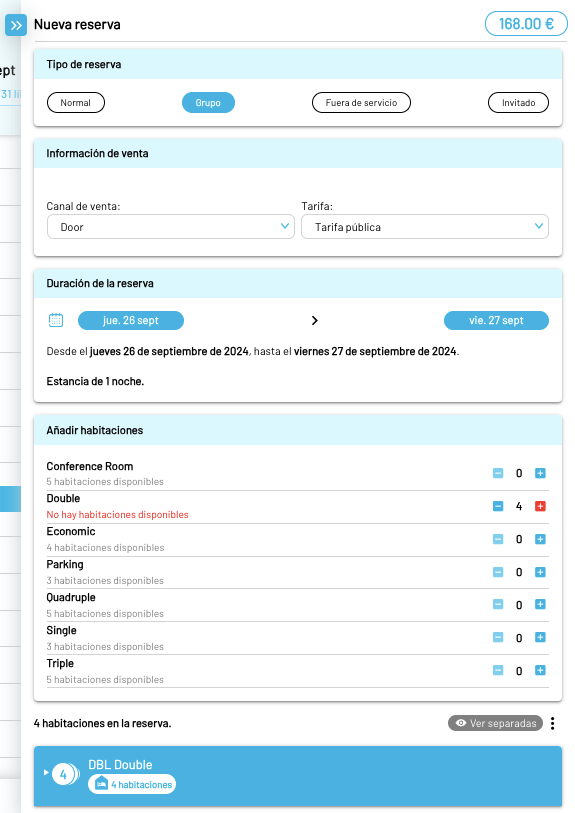
In Roomdoo, a group is a reservation with more than 4 rooms. The flow is the same as a normal reservation, but after clicking **New reservation** in the top-right of the calendar you pick "Group" instead. Then fill in:
* The sales channel the reservation came from.
* The rate that applies.
* Check-in and check-out dates.
* The rooms in the group.
From here, continue as you would for a normal reservation. See the guide on how to create a reservation in Roomdoo for the full flow.
### More on managing reservations
* [Create a direct reservation](/en/reservations/create-reservation)
* [Search for reservations](/en/reservations/search-reservations)
* [Modify the dates of a reservation](/en/reservations/modify-dates)
* [Create blocks](/en/reservations/blocks)
* [Group reservations](/en/reservations/group-bookings)