> ## Documentation Index
> Fetch the complete documentation index at: https://docs.roomdoo.com/llms.txt
> Use this file to discover all available pages before exploring further.
# How to check in a guest in Roomdoo
> Step-by-step guide to checking in a reservation in Roomdoo: verify guests, complete their details and mark the arrival in seconds.
Here's how to check in a guest from Roomdoo:
And here are the full step-by-step details:
* Open the reservation arriving today, either by reservation number or from the planning.
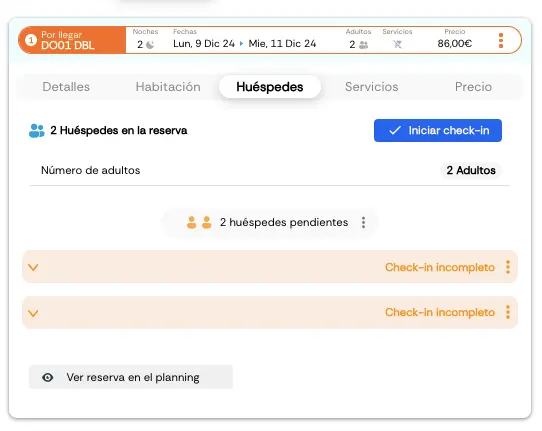
* Go to the **Reservation → Guests** tab.
* Check that the guest count is correct. To add a guest, click the three dots, increase the number of guests (up to the room's maximum capacity), and save.
* Click "Start check-in" and then "Begin check-in".
* Pick the customer segmentation that fits best.
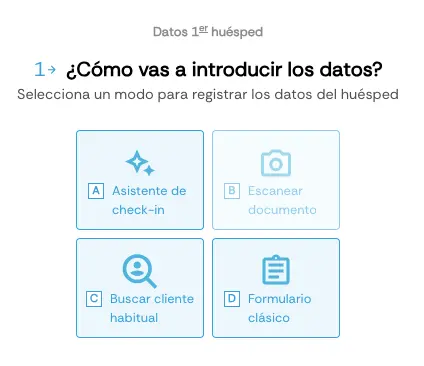
* Next, enter the guest's details. You have several options:
**A. Check-in wizard:** A guided flow that walks you through the fields.
**B. Scan document:** Use the camera to scan the guest's ID — fields autofill from the document.
**C. Find returning guest:** If the guest has stayed before, type their ID number and Roomdoo loads their existing record.
**D. Classic form:** Fill in every field by hand on a single page.
Whichever option you pick (unless the guest is already on file), complete the following fields — you can save them even without finishing the check-in:
* Document-issuing country.
* Document type.
* Document number.
* Full name.
* Date of birth.
* Nationality.
* Contact details (email, phone, etc.).
* Full address.
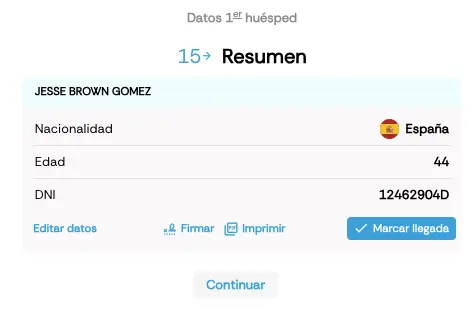
After filling in each guest's details, click **Mark arrival** to finish the check-in.
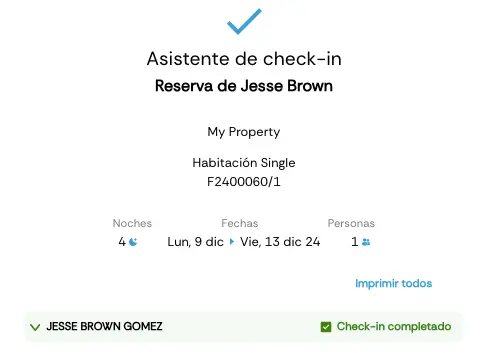
When every guest has been checked in, the reservation status becomes *In-house*, marking that all guests are inside.
Roomdoo also offers **Pre check-in**, sending a link to the guest before arrival so they fill in their own details ahead of time.
To send it, go to the **Reservation** tab, click **Public folio link**, and send it by email.
You can also **do pre check-in for future reservations** by going to the Guests tab → Register pre check-in and following the same steps as a normal check-in. When the guest arrives, since the pre check-in is already done, you just click **Mark arrival**.
See here how to [check out a guest in Roomdoo](/en/reservations/check-out).