> ## Documentation Index
> Fetch the complete documentation index at: https://docs.roomdoo.com/llms.txt
> Use this file to discover all available pages before exploring further.
# Creating blocks
> Create blocks in Roomdoo to pull rooms from sale due to maintenance, cleaning or revenue reasons, and see how they show on the calendar.
Blocks are for exceptional cases — a serious issue that prevents selling a room, a room that can't be cleaned in time, or revenue-management reasons.
To create a block in Roomdoo, when you start a new reservation pick "Out of service" instead of "Normal" and add more detail in the description if you want.
As with a normal reservation, you pick dates and rooms and save.
## How it looks on the calendar
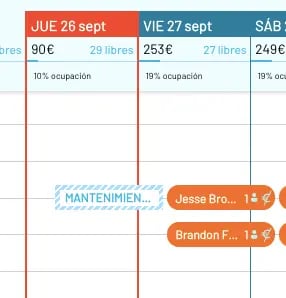
Once saved, the block appears in striped light blue on the calendar.
### More on managing reservations
* [Create a direct reservation](/en/reservations/create-reservation)
* [Search for reservations](/en/reservations/search-reservations)
* [Modify the dates of a reservation](/en/reservations/modify-dates)
* [Create blocks](/en/reservations/blocks)
* [Group reservations](/en/reservations/group-bookings)