> ## Documentation Index
> Fetch the complete documentation index at: https://docs.roomdoo.com/llms.txt
> Use this file to discover all available pages before exploring further.
# Errors uploading the INE file to IRIA
> The most common errors when uploading to IRIA the INE XML file generated with Roomdoo: what they mean and how to fix them.
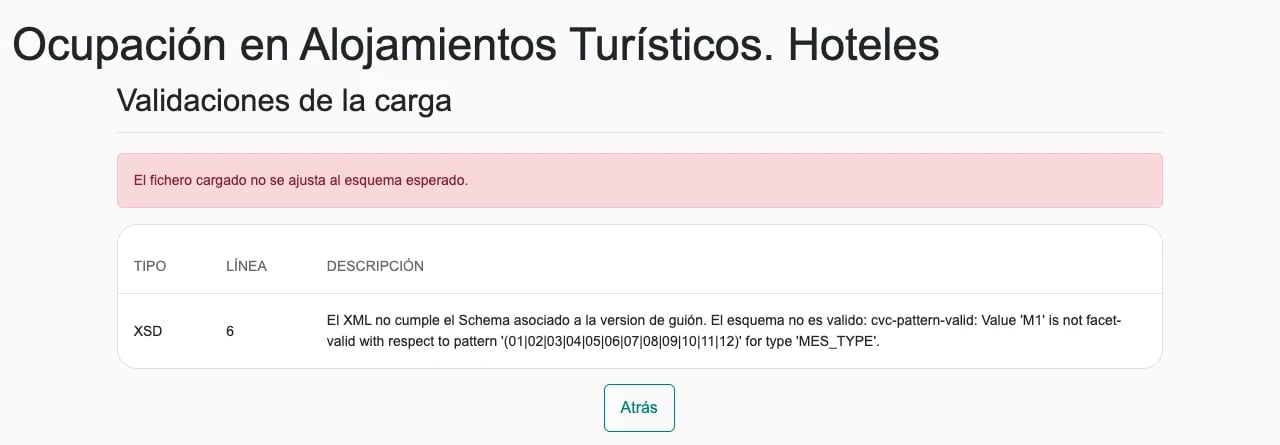
## Where the errors show up
After uploading the file and clicking **Enviar cuestionario**, IRIA checks the file and shows the result under **Validaciones de la carga** (Upload validations). If there are errors, you'll see one of these notices and a table with the details (**TIPO**, **LÍNEA** and **DESCRIPCIÓN**):
* **El fichero cargado no se ajusta al esquema esperado.** (The uploaded file doesn't match the expected schema.) The file doesn't have the structure the INE expects.
* **El fichero cargado no cumple todas las validaciones.** (The uploaded file doesn't pass all validations.) The structure is correct, but the data breaks one of the INE's rules.
For any error, click **Atrás** (Back) and **don't click Acceder al cuestionario**: once inside, you can no longer upload another file for that questionnaire. As long as you don't open it, you can fix and upload the file again as many times as needed.
Don't edit the file by hand. Fix the cause in Roomdoo, generate the file again and upload it again. If you don't know the cause, send us a screenshot of the **Validaciones de la carga** screen: with it we can almost always tell what's going on.
## Common errors
(Overnight stays from day 2 to 31 must equal the previous day's overnight stays plus that day's arrivals minus departures.)
**Cause:** the file doesn't cover the whole month. It has almost always been generated with only the week or fortnight the questionnaire asks for: if it starts on the 2nd it fails on day 2, and if it ends on the 8th it fails on day 9. This is the most common error.
**Fix:** generate the file again in Roomdoo with **From** the 1st and **To** the last day of the month, and upload it again. Roomdoo generates exactly the dates you choose: it doesn't extend the period to the whole month.
**Cause:** the chosen period runs into the next month (for example, from 1 July to 1 August), so day 01 appears twice.
**Fix:** generate the file for exactly the calendar month, from the 1st to the last day of that month.
**Cause:** you uploaded the hotels file to a **tourist apartments** questionnaire.
**Fix:** see [Tourist apartment occupancy survey](/en/compliance/ine-apartments).
(Occupied places on a day can't exceed available places plus extra beds.)
**Cause:** on some day there are more guests staying than places, for example because of cots or children registered at check-in without an extra bed added to the reservation, or because the property's places aren't set up correctly. The file only declares extra beds if they're added to the reservation as an extra bed service.
**Fix:** add the extra bed to the affected reservations (see [Add an extra bed](/en/settings/extra-bed)), generate the file again and upload it again. If you don't know which reservations they are, or you think your property's places are set up wrong, contact support.
**Don't delete children's check-ins** to make the places add up. For the INE, everyone who stays overnight counts as a traveller, whatever their age, and the traveller report requires registering them.
**Cause:** the file has no guests in the month. The report is built from **check-ins**, not reservations: if there are reservations but no check-in done, the guests block is empty.
**Fix:** complete the check-ins for the month's stays and generate the file again. See [INE report fails because of incomplete guest data](/en/compliance/ine-incomplete-data).
**Cause:** the property's province name is too long for the INE format (this happens, for example, with «Illes Balears (Islas Baleares)»).
**Fix:** contact support.
**Cause:** the INE has its own code for Kosovo that Roomdoo doesn't include, so those guests' country comes out empty and the file fails the schema.
**Fix:** contact support with the report's month.
See [INE: 'ADR sum by customer type isn't 100%'](/en/compliance/ine-adr-error).
## If you've already opened the questionnaire
If you clicked **Acceder al cuestionario** and errors appear afterwards, they're shown inside, under **Errores en la cumplimentación del cuestionario**. You can no longer upload another file: fix in the form the data that can be edited (the establishment details and, on the last screen, prices and staff). If the error is in the guest or room data, which can't be edited, contact the INE's data collection unit: their details appear in the questionnaire itself.
## When to contact support
* The error isn't in this guide or you don't know what causes it.
* You don't know which reservations or guests cause the error.
* You think your property's INE setup (places, province, category) is wrong.
Send us a screenshot of **Validaciones de la carga** and the report's month at [soporte@roomdoo.com](mailto:soporte@roomdoo.com).
This documentation is built and hosted on [Mintlify](https://mintlify.com), a developer documentation platform.