> ## Documentation Index
> Fetch the complete documentation index at: https://docs.roomdoo.com/llms.txt
> Use this file to discover all available pages before exploring further.
# Booking.com: who collects payment for your reservations
> Booking.com's payment options (Payments by Booking.com with virtual card or bank transfer, and pay at the property), how to tell which one your property uses in the extranet and on the public listing, and what you'll see in Roomdoo in each case.
On Booking.com, a reservation can be paid to **your property** or to **Booking.com**. It depends on how your account is set up and on the rate the guest chooses: the same property can have rates of both kinds. Knowing who collects each reservation avoids charging the guest twice and tells you what to do in Roomdoo.
Booking.com defines these payment options and their conditions, and they can vary by country. This summary is based on Booking.com's official partner help (links at the end) and on what we checked in real extranets in October 2026. The screenshots show the Spanish version of the extranet.
## Payment options
| | Who charges the guest | When | How you get the money |
| - | - | - | - |
| **Pay at the property** | Your property | Usually at check-in or check-out | Directly from the guest, with your card terminal or in cash. The card the guest gives Booking is only a guarantee |
| **Payments by Booking.com**, at booking | Booking.com | When the reservation is made (for example, non-refundable rates) | With a **virtual credit card** per reservation, which you charge on your card terminal, or by **bank transfer** from Booking.com |
| **Payments by Booking.com**, "pay later" | Booking.com | Before the free cancellation period ends | Same as above |
Some details about the virtual credit card, according to Booking.com's help:
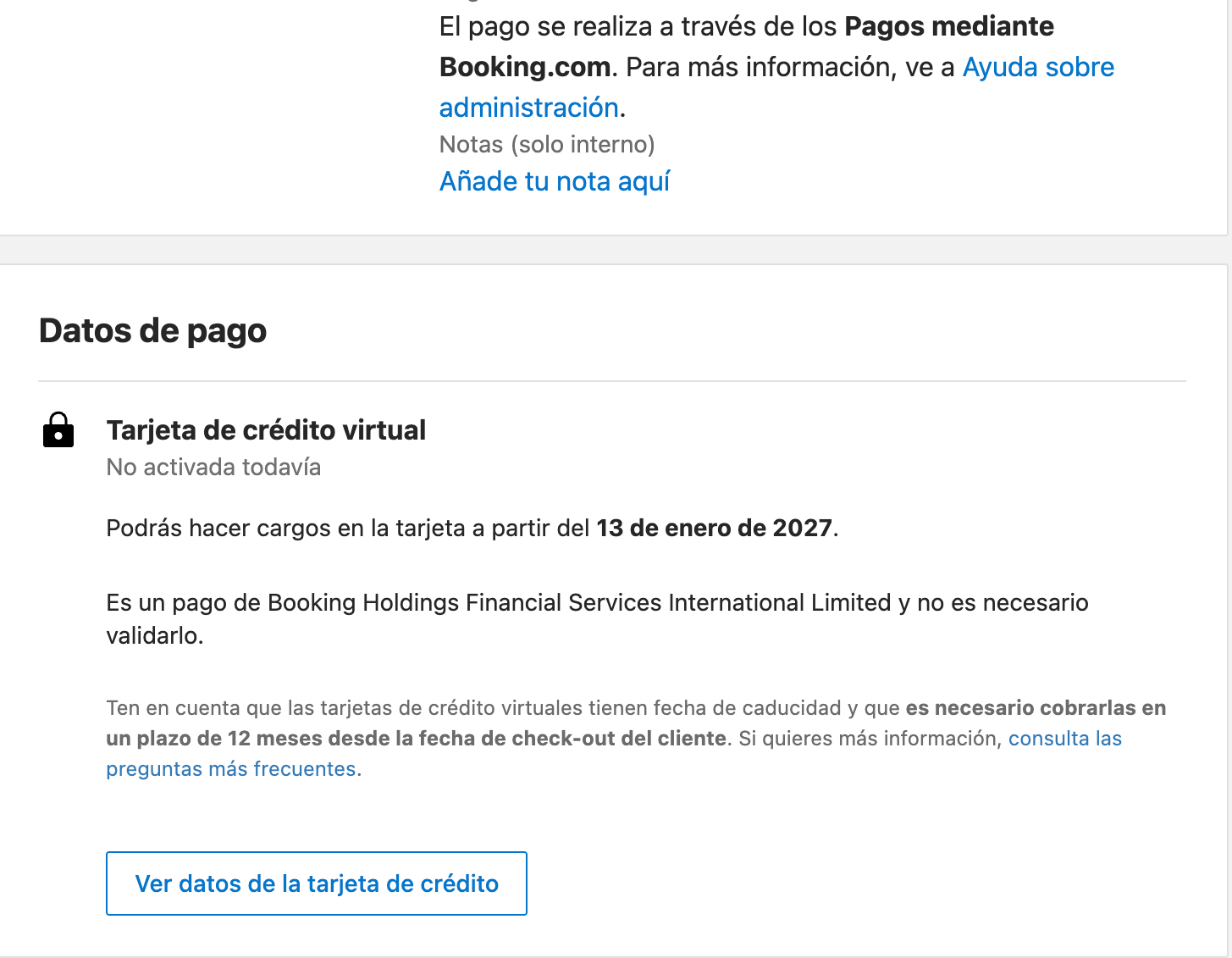
* Each reservation has its own card, and it can only be charged **from an activation date**. The reservation shows "Not activated yet" and the date from which you can charge it.
* For non-refundable reservations it's activated straight away. For the rest, when the reservation can no longer be cancelled for free.
* You have up to **12 months after the guest's check-out** to charge it.
Anything not included in the Booking price (for example, the tourist tax) is still charged by your property.
## How to tell which one your property uses
### In your extranet
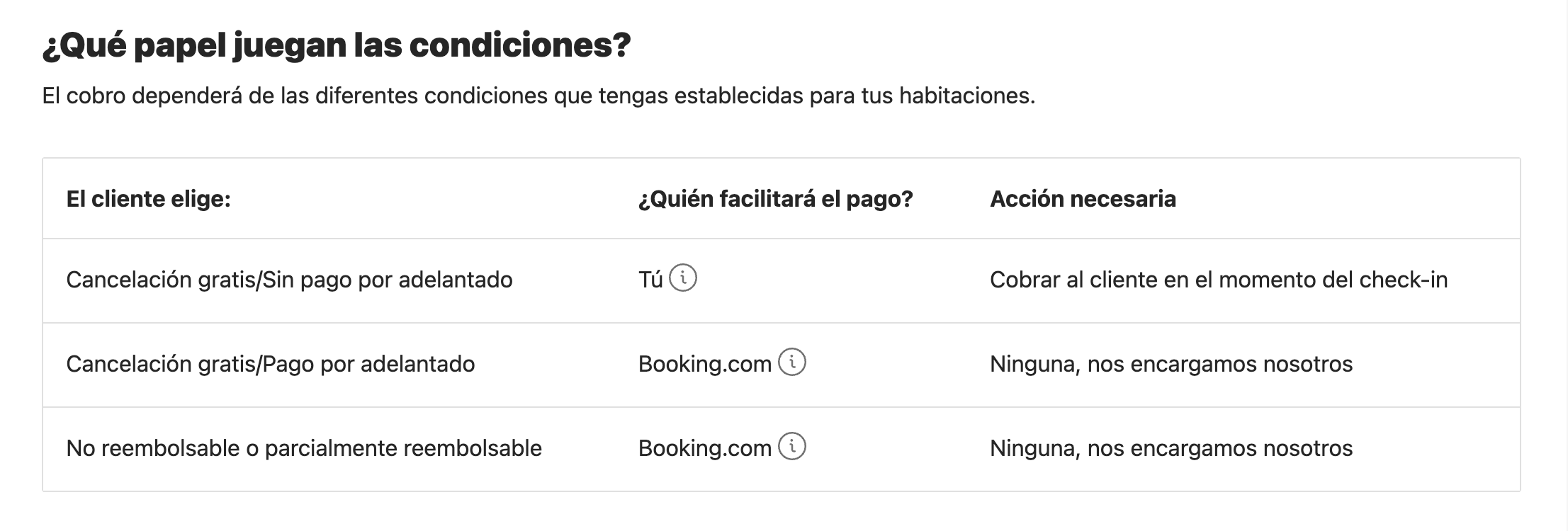
Type **payments** in the extranet search box and open **Payments by Booking.com**. It shows whether it's active and a table of who collects payment depending on the condition the guest chooses.
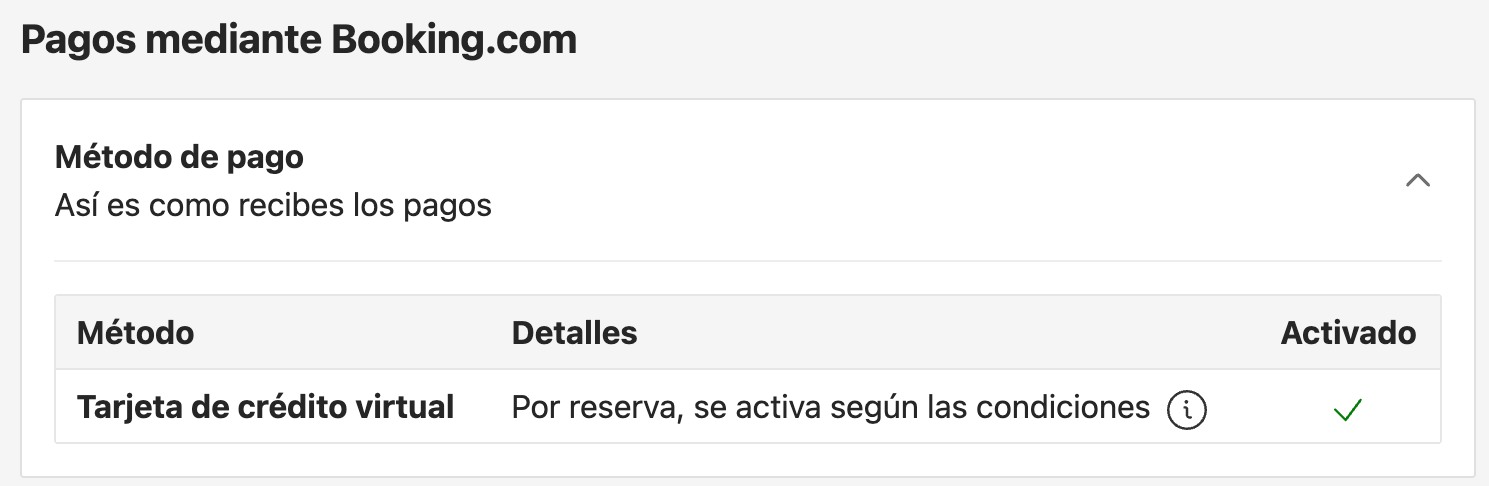
In **Finance → Finance settings**, under Payments by Booking.com, you'll see the method: **virtual credit card** or bank transfer.
In **Property → Policies**, each policy says who charges and when. For example: "Booking.com will charge the guest the full prepayment amount before the free cancellation period ends".
In the reservation details, the payment section says, for example, that payment is made through Payments by Booking.com, and shows the virtual card with its activation date.
### From the outside, on your property's Booking.com listing
If you don't have the extranet at hand, the public listing gives plenty of clues. Next to each rate, Booking.com shows the guest texts like these (shown here as they appear on the Spanish site):
| What the guest sees | Who collects payment |
| - | - |
| "No prepayment needed · Pay at the property" (*Sin pago por adelantado · Pagarás en el alojamiento*) | Your property |
| "Pay nothing until {date}" (*No pagues nada hasta el {fecha}*) | Booking.com, on that date |
| "Non-refundable · Pay online" (*No reembolsable · Pagas online*) | Booking.com, at booking |
| "Pay the property before arrival" (*Pagas al alojamiento antes de llegar*) | Your property, before arrival |
Check rate by rate and on several dates: each rate can be collected differently.
## What you'll see in Roomdoo
| If the reservation… | In Roomdoo |
| - | - |
| Is collected by your property | It shows the amount as outstanding. Record the payment when you charge the guest |
| Is collected by Booking.com and paid to you by **bank transfer** | The payment is recorded automatically when the reservation arrives, and nothing is outstanding |
| Is collected by Booking.com and paid to you with a **virtual card** | It shows the amount as **outstanding** until you charge the virtual card on your terminal and record that payment |
If Booking.com collects the reservation, **don't ask the guest to pay**: they have paid or will pay Booking.com. To stop it showing as outstanding in Roomdoo, charge the virtual card from its activation date and record that payment. If you think a guest has paid twice, see [Real overpayment / duplicate charge](/en/payments/real-overpayment).
To record the virtual card payment, follow [How to record a payment](/en/payments/record-payment), using the journal you use for your card terminal.
## Common cases
Booking.com most likely collects it and pays you with a virtual card. Check the reservation details in your extranet. If so, don't charge the guest: charge the virtual card once it's active and record the payment in Roomdoo.
Check its activation date in the reservation details: it can't be charged before then. If it's already active and the charge fails, contact Booking.com.
It's a typical rounding mismatch. See [Cent-level overpayments on prepaid OTA reservations](/en/payments/ota-cents-overpayment).
## When to contact support
* A Booking.com reservation paid by **bank transfer** doesn't show the payment recorded in Roomdoo.
* You think a guest has paid a Booking.com reservation **twice**.
## Booking.com sources
* [Joining Payments by Booking.com](https://partner.booking.com/en-us/help/payments-payouts-invoices/payments-bookingcom/joining-payments-bookingcom)
* [Everything you need to know about virtual credit cards](https://partner.booking.com/en-us/help/policies-payments/payment-products/everything-you-need-know-about-virtual-credit-cards)
* [Setting prepayment policies](https://partner.booking.com/en-us/help/property-guest-experience/policies-services-amenities/setting-prepayment-policies)
## Related
This documentation is built and hosted on [Mintlify](https://mintlify.com), a developer documentation platform.