> ## Documentation Index
> Fetch the complete documentation index at: https://docs.roomdoo.com/llms.txt
> Use this file to discover all available pages before exploring further.
# Booking.com: how your emails reach the guest
> What Booking.com does with the emails you send from Roomdoo to the @guest.booking.com address: Booking's plain-text messaging, the email forward, links and guest replies.
This article describes what **the Roomdoo team has verified in real tests** in October 2026, by sending emails to Booking.com reservations and checking them in the extranet, in the guest's Booking app and in their inbox. **It is not based on official Booking.com documentation**, which doesn't describe this behaviour, and it may change without notice.
The screenshots show the Spanish version of the extranet. Menu names may vary slightly depending on your language.
## Key points
* Booking.com doesn't give you the guest's real email but an intermediate address (`…@guest.booking.com`). What you send to that address reaches the guest **in two ways**: first in **Booking's messaging**, instantly and as plain text, and then in their **email**, with the full design.
* In the messaging, **buttons stop being clickable**. Web addresses written out as text can still be tapped, as long as their domain is authorised.
* None of this works unless you have authorised Roomdoo in your extranet. Do that first: [Booking.com: authorise Roomdoo's emails and links](/en/channel-manager/booking-authorize-emails).
## First channel: Booking's messaging
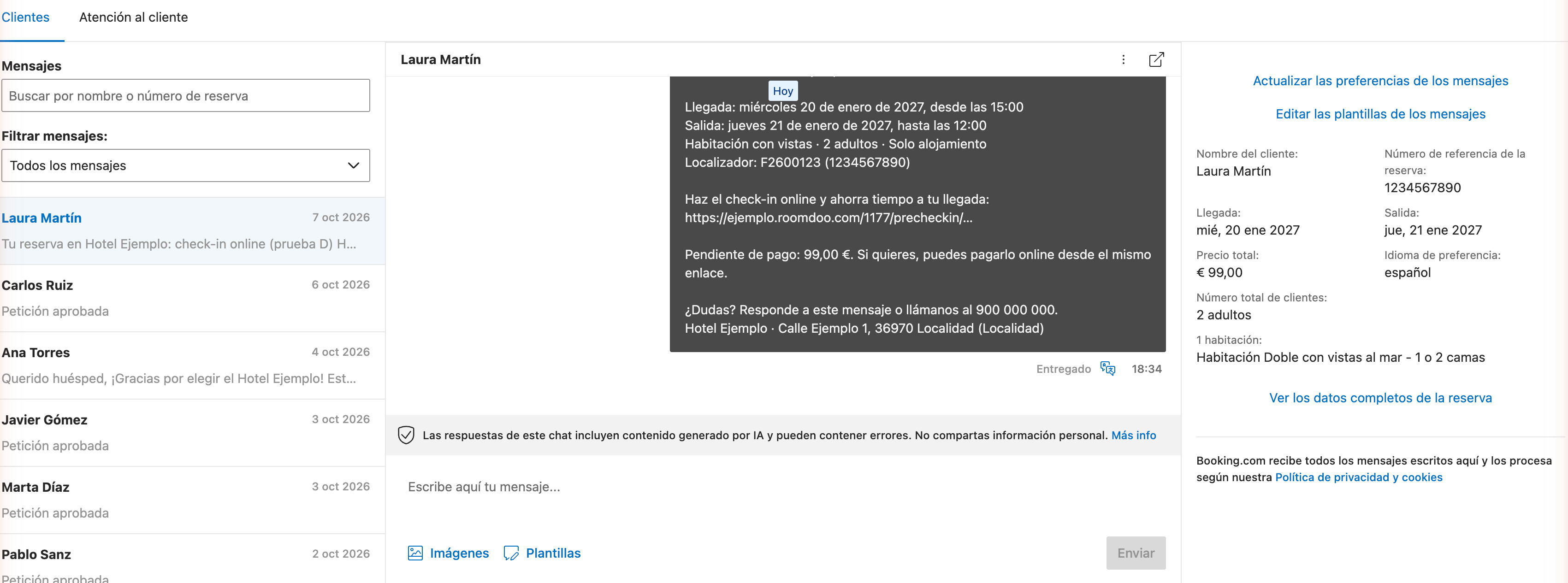
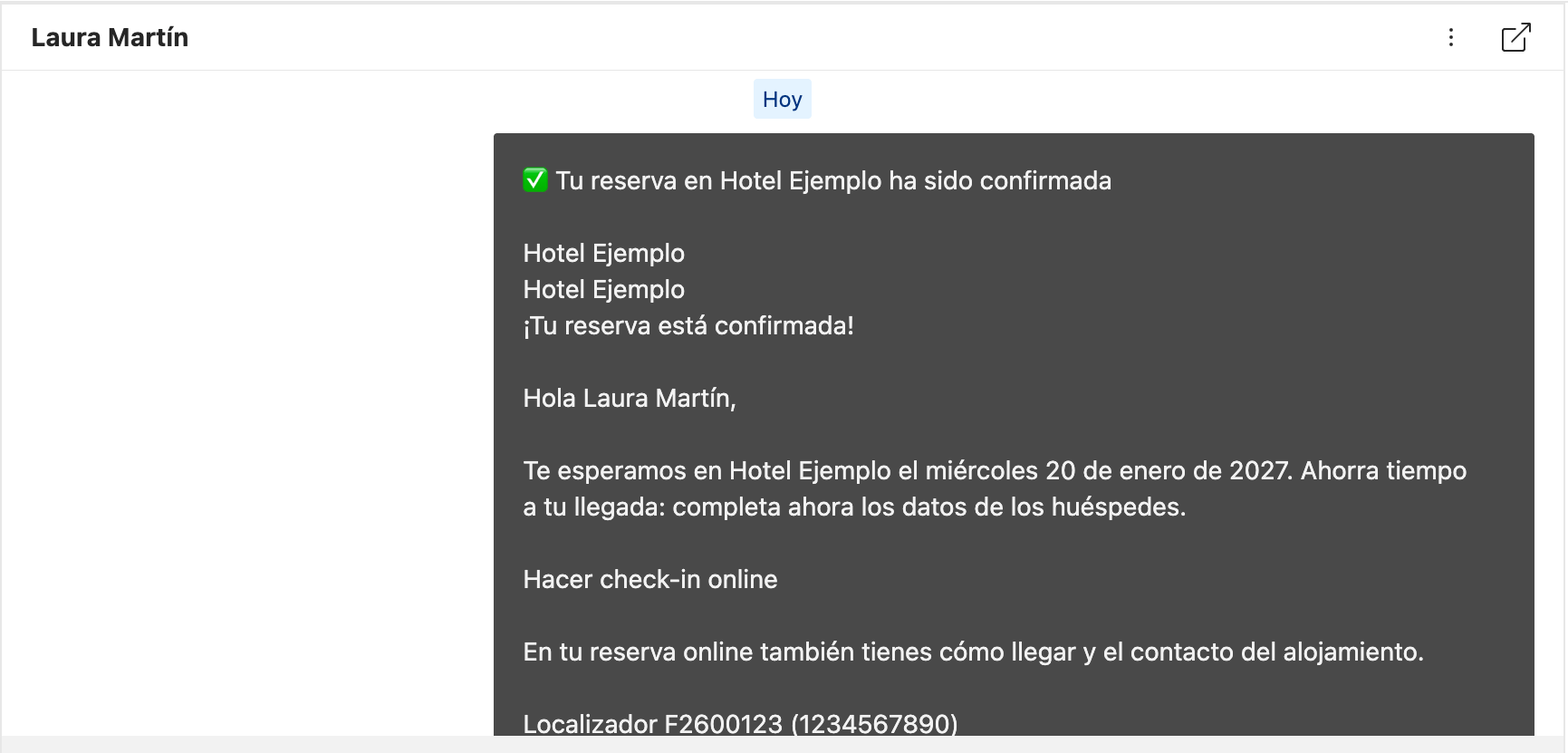
As soon as Roomdoo sends the email, it appears in the reservation's conversation:
* **For the guest**, in the Booking app and website (Inbox).
* **For you**, in the extranet (**Inbox → Reservation messages**) and in the **Pulse** app.
What we saw in the messaging:
* **Booking turns the email into plain text.** The text is readable, but design, images and buttons are lost. "Do online check-in" shows up as text, without a link.
* **Web addresses written as text do work.** If the email includes the full address (for example `https://yourhotel.roomdoo.com/…`), it shows up as a link in the guest's app and can be tapped.
* **Links to domains that aren't authorised are replaced with `[link removed]`.** This happens, for example, with the link to the hotel's website if you haven't added it to your approved links.
* **Booking adds a warning** telling the guest to be careful when clicking links.
* **Long lines are wrapped** at around 80 characters.
* In your extranet, web addresses show as plain text without a link. That's expected: the guest is the one who needs to tap them.
## Second channel: the guest's email
Booking also forwards the email to the guest's real address:
* It arrives **with the full design**: logo, images and buttons.
* **Links to authorised domains work** and go straight to their destination. Links to domains that aren't authorised arrive as `[link removed]`, as in the messaging.
* The sender is a Booking address in your property's name (for example "Your hotel via Booking.com").
* Booking adds a reply line at the top and a notice that the content is the property's responsibility.
* **It doesn't arrive at the same time as the message.** In our tests it took from a few minutes to over an hour.
## If the guest replies
The reply **goes back through Booking**: you'll see it in the reservation's conversation, in the extranet or in Pulse. It doesn't reach the reply-to address you have set in Roomdoo.
## Recommendations
Add `notifications@roomdoo.com` and `roomdoo.com` in Messaging preferences → Security settings. Without this step, Booking doesn't deliver the emails or removes the links. Step by step: [authorise Roomdoo's emails and links](/en/channel-manager/booking-authorize-emails).
If your messages or Booking templates link to your property's website, also add your domain under **Your approved links**. Otherwise it will show as `[link removed]`.
If you have automatic messages in Booking (for example, a welcome message when someone books), the guest receives them together with Roomdoo's. Check **Messaging preferences → Auto-replies** and **Template scheduler** so they don't overlap.
## Common cases
They're looking at it in Booking's messaging, where buttons don't work. They can open the email that arrives afterwards, where the button works, or tap the web address if the message includes it written out.
That link points to a domain that isn't in **Your approved links**. If it's a Roomdoo link, check that `roomdoo.com` is authorised. If it's your website, add your domain.
The email arrives later than the message, sometimes much later. If it still hasn't arrived after a few hours, ask them to check their spam and make sure your authorisation is complete.
Replies go back through Booking. Check them in the reservation's conversation, in the extranet or in Pulse.
## When to contact support
* You have authorised `notifications@roomdoo.com` and `roomdoo.com` and your Booking.com guests **don't receive any message** from Roomdoo.
* In the **email** (not the messaging), Roomdoo's links still show as `[link removed]`.
## Related
This documentation is built and hosted on [Mintlify](https://mintlify.com), a developer documentation platform.